
An agency buys influencer marketing software for a different job than a brand does. A brand runs one program. An agency runs several at once, does unpaid research to win the next one, and has to show its work to clients who may never log in. The best platform for an agency keeps clients apart, makes pitch research reusable, and turns campaign data into something a client can read without a meeting.
We recommend Streamforge for agencies that win and keep accounts on research. It brings competitive intelligence and audience analysis to the pitch, then runs each client’s campaigns with their own stages, budget and reporting, shared through links you control. Evaluate CreatorIQ when clients expect to approve pitch sheets and content inside the software, and GRIN or Upfluence when clients run gifting, affiliate and creator-payment programs for online stores. Modash sells a creator data API to agencies that build their own tools, and Aspire suits agencies that work inside each client’s own account.
Disclosure: Streamforge publishes this guide and is included below. We used public vendor pages and help documentation, not a side-by-side product test. The best-fit recommendations are editorial judgments, and the numbered order is for navigation.
What changes when an agency is the buyer
Most platform comparisons are written for in-house teams. Six differences decide an agency purchase.
Several clients at once. An agency holds creators, rates and notes for every client, sometimes for two clients in the same category. The platform has to keep each client’s campaigns, budget and reporting apart, and control who sees what.
Research before anyone pays. The creator list in a pitch deck is built before the client signs, and the hours are written off if the pitch is lost. Shortening that research can matter more to new-business economics than any campaign feature.
Shortlists that leave the building. An agency’s shortlist goes to a client, who will ask why each creator is on it. The reason has to travel with the name: audience fit, past sponsors, brand-safety notes.
Reports a client reads. Monthly reporting is where agency margin leaks, because senior people spend the week taking screenshots. A report the client can open, and that you can stop sharing when the engagement ends, gives those hours back.
Research that outlives the pitch. The category map built to win one beauty brand is useful the next time you pitch a beauty brand, if it was saved somewhere other than a deck.
Pricing that follows your book. A plan priced by seats, by opened profiles, by modules or by a share of creator spend costs very different amounts in the month you win three accounts and the month you lose one.
Compare the platforms for agency work
Pricing and features were checked October 27, 2026. Published prices are in USD. GRIN bills monthly and adds a management fee to the money deposited to pay creators; Modash lists its API prices per year.
| Platform | Best fit for agencies | Pricing or access |
|---|---|---|
| Streamforge | Our recommendation for agencies that pitch on research: competitive intelligence and audience analysis, then campaign workflow with per-client stages, budgets, reporting and controlled client sharing | Discuss your client book |
| CreatorIQ | Agencies whose clients approve pitch sheets and planned content in the platform, with a co-branded, view-only client view | Request pricing |
| Modash | Agencies building their own pitch, vetting and reporting tools on a creator data API | Discovery API from $16,200/year; Raw API from $10,000/year |
| GRIN | Agencies running gifting, affiliate and paid creator programs for several e-commerce brands | Growth: $500/month plus 7% of wallet deposits |
| Upfluence | Agencies running commerce-led campaigns from shortlist to creator payment and client report | Custom quote by module, team size and volume |
| Aspire | Agencies that run ambassador, UGC and affiliate programs inside each client’s own Aspire account | No public price list; book a demo |
Follow a platform name to its review, or a pricing link for current terms.
1. Streamforge
Best for: agencies that win accounts on research and run several clients’ campaigns, from the pitch shortlist through outreach, budgets and deliverables to the client report.
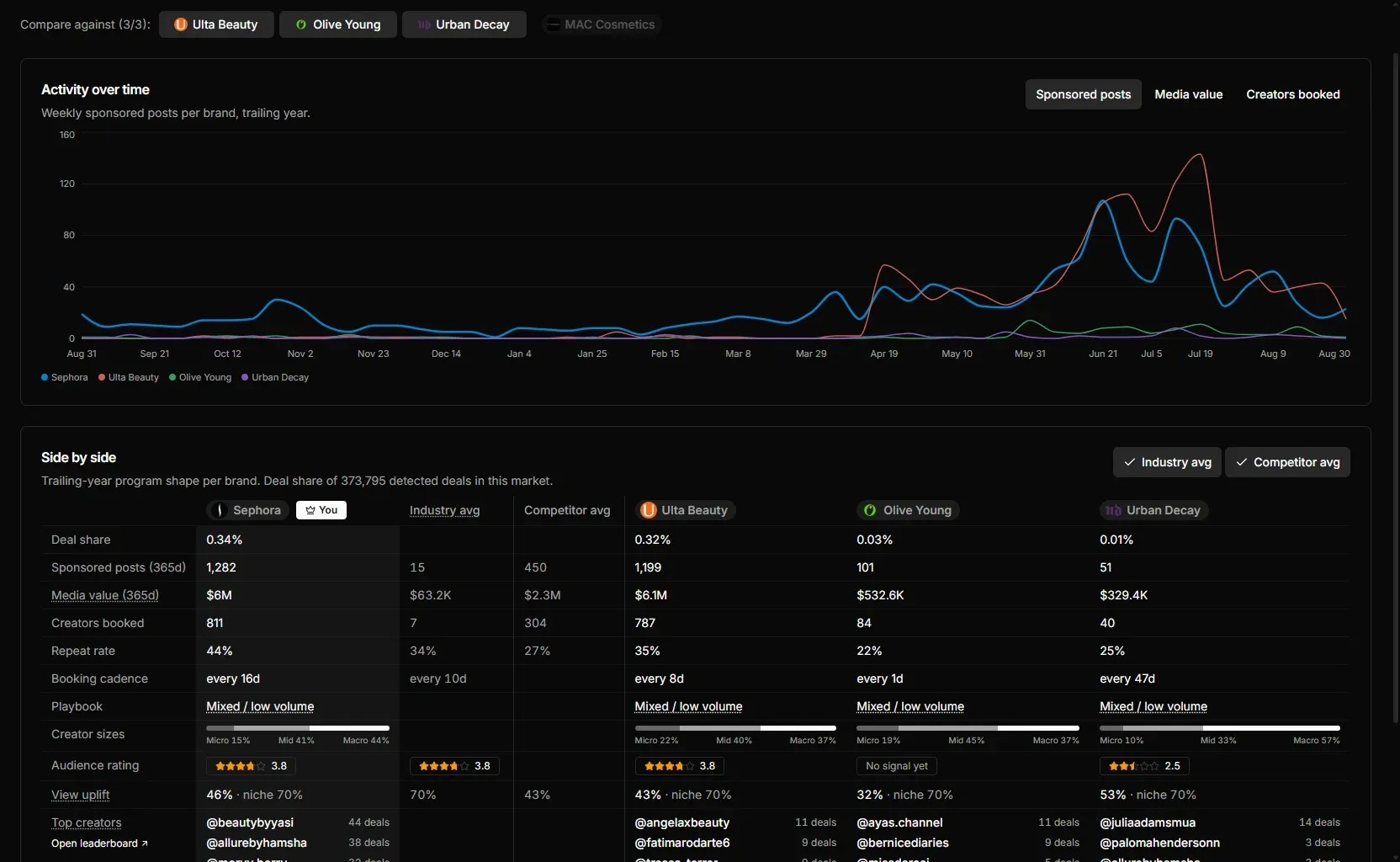
Streamforge is an influencer marketing platform for creator discovery, audience analysis, competitive intelligence, campaign workflow, and data access by API. For an agency, those follow the life of an account: the pitch, the recommendation, the campaign and the report. The agencies page shows the same path.
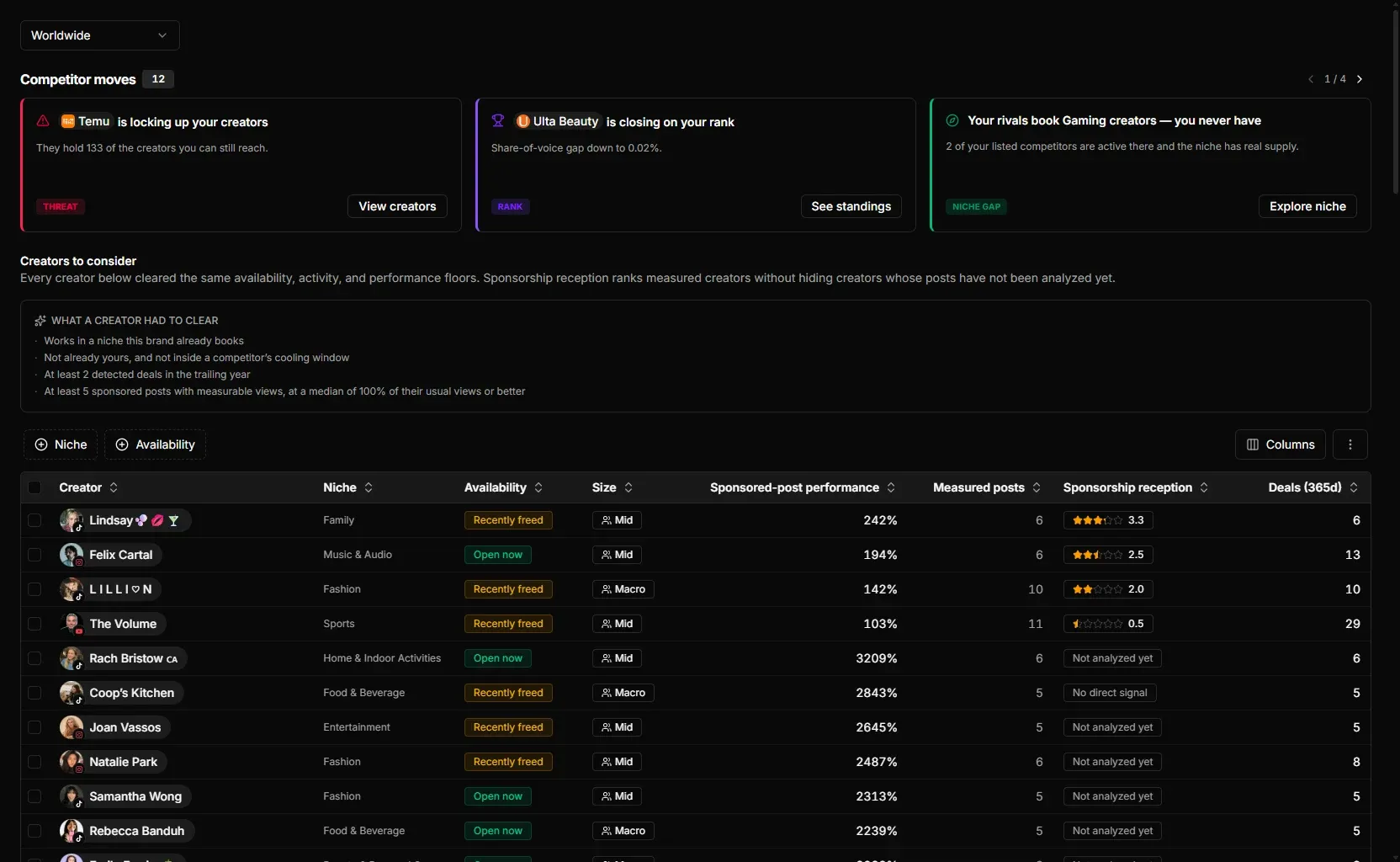
The pitch. Streamforge Intelligence is a separate Streamforge product that some agencies make part of their new-business work. Pull up a prospect’s category and you see each brand’s creator activity, paid and organic, with spend estimates, share of voice and strategy trends, plus benchmarks for what creators charge. The first meeting can open with which creators the prospect’s competitors book, how often, and which relevant creators none of them has booked yet. The guide to analyzing competitor creator partnerships explains how the sponsorships are identified.
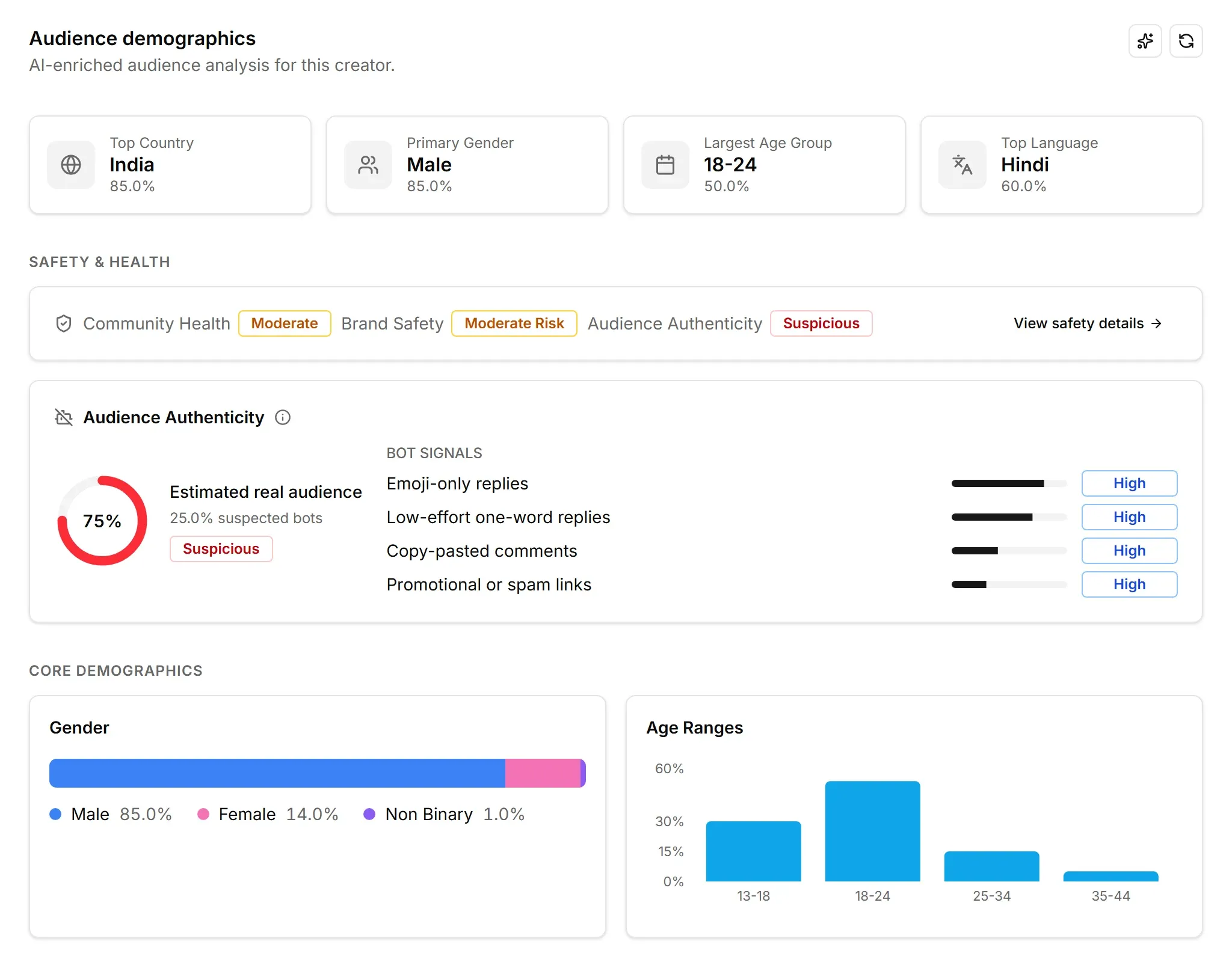
The recommendation. A client’s first question about a shortlist is who is watching. Streamforge’s audience analysis is AI-based and does not require the creator to authenticate through OAuth. The model was trained on first-party audience data, and in Streamforge’s tests its results are extremely close to the platforms’ direct metrics. Because the technique is not limited to creators who have opted in, an agency can read the audience behind the names on a pitch list before contacting anyone. Audience analysis is supported across YouTube, Twitch, TikTok, Instagram, and X.
Two more checks answer a client who asks whether the numbers are real. Streamforge analyzes the comments on a creator’s posts, videos and streams using AI to detect bot behaviour, writing styles, and repetitive phrases or comments that do not engage with the content. On TikTok, Instagram and YouTube, it flags posts whose views were inflated by a brand paying to promote them, and estimates how many views were paid for. As for the data underneath, Fortune 500 companies have tested Streamforge’s creator data side by side against other vendors, and Streamforge came out ahead in every completed evaluation.
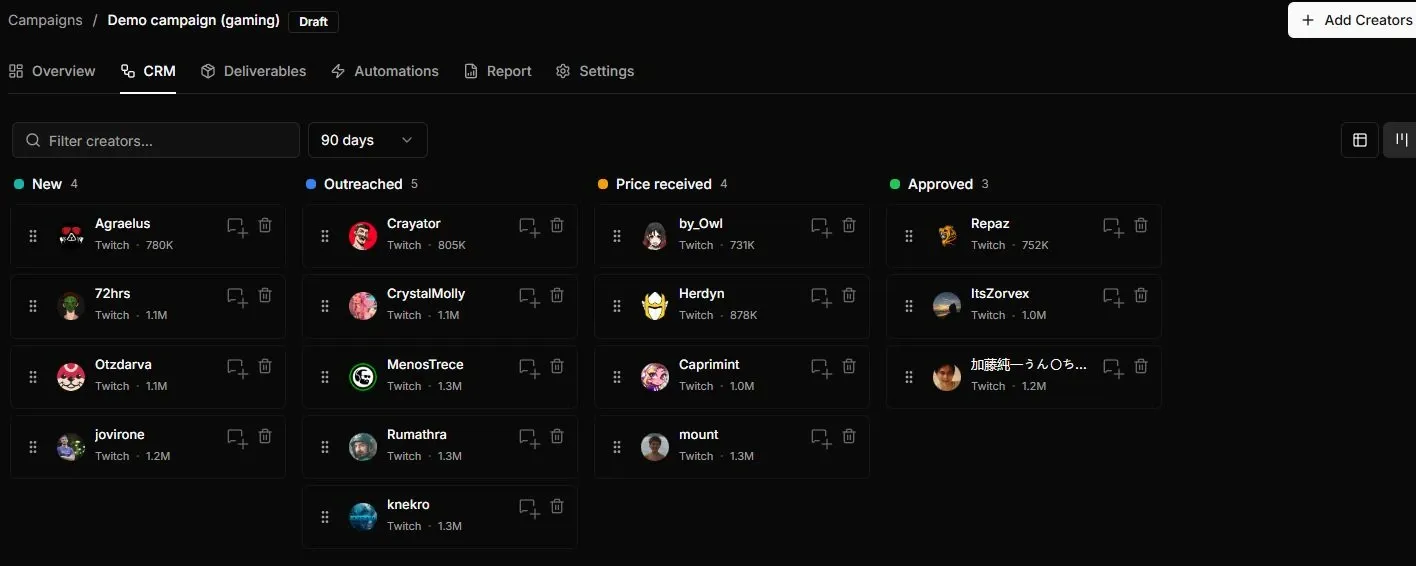
The campaign. In Streamforge Workflow, each client’s campaigns get their own stages, budget and reporting, and templates carry stages, fields and deliverable settings from one client to the next. Campaign operations include email outreach, assigned owners, creator rates and budgets, deliverables with deadlines, bulk edits and tracking links. Organization roles and a campaign activity history show who did what on each account. Streamforge also has its own agent, native to the platform, that can do everything a user can do in the product.
The report. Selected campaign stages and fields can be shared through links with expiry and revocation controls. A stage holding the pitch shortlist can go to the client before outreach starts, showing only the fields you choose, and the link can be switched off when the engagement ends. Reports are built to be presented to clients as they are. Agencies that want their own brand on the report can pull Streamforge data into their own dashboards and client portals through the API: one integration, five platforms.
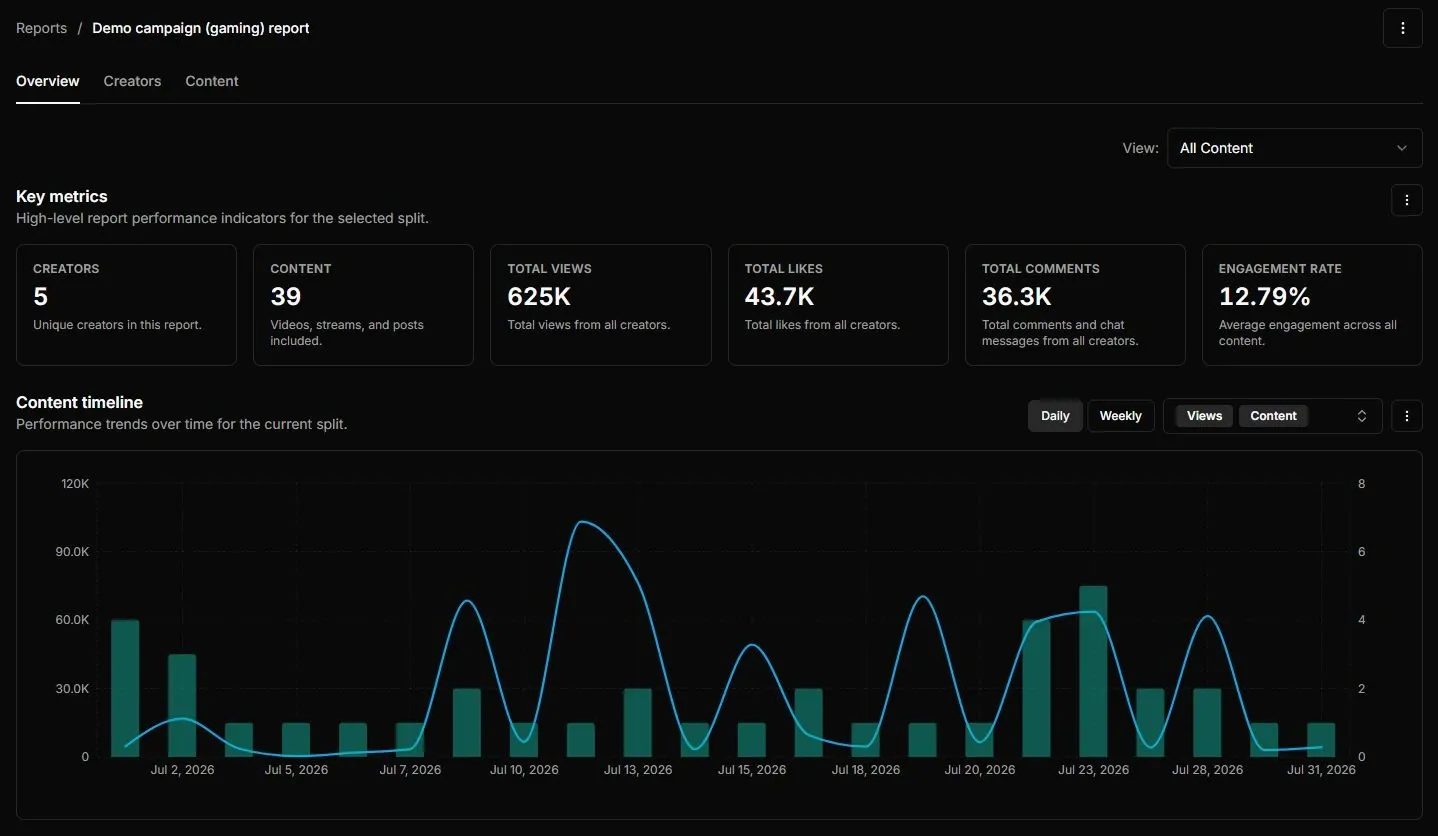
Key features for agencies
- Competitive intelligence on a prospect’s category before the first meeting.
- Audience analysis and comment authenticity for the creators you recommend, with no creator sign-in.
- Per-client campaigns with custom stages, owners, budgets, rates, deliverables, outreach and tracking links.
- Reusable templates, activity history and expiring share links for client review and reporting.
Buying consideration: an agency that pays creators on its clients’ behalf, runs affiliate commissions, or needs clients to approve creators and drafts inside the software should test those workflows in CreatorIQ, Upfluence or GRIN as well. Streamforge fits the agency whose value is the research and the running of the campaign.
Pricing and access: pricing depends on your book of business. Talk to Streamforge with your client list and platforms, and say whether pitch research with Streamforge Intelligence is in scope.
2. CreatorIQ
Best for: agencies whose clients expect to approve pitch sheets and planned content inside the platform, and to follow the program through a co-branded, view-only window.
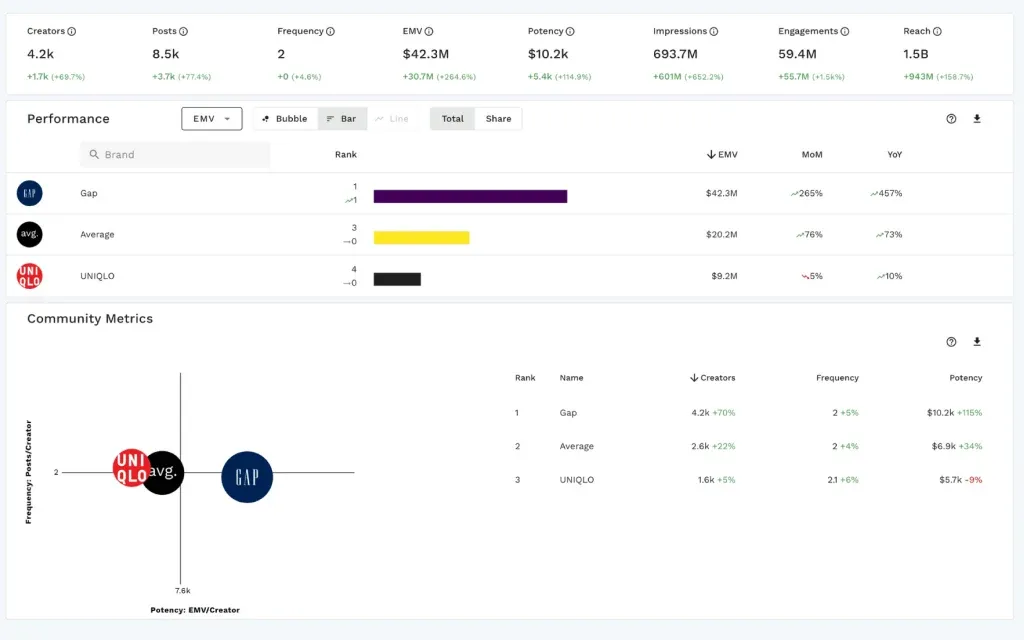
CreatorIQ’s agency page is built around working with clients. Agencies can share talent pitch sheets for approval, invite clients to review, comment on and approve planned creator content, and publish or export campaign wrap reports. The page also describes a co-branded, secure, view-only extension of the agency’s environment for a brand client. Behind that sit discovery across millions of public profiles, tools to onboard, manage, activate and pay creators, and multi-brand governance with roles, workflows and audit trails.
What to evaluate
- A pitch sheet and a content approval run end to end by someone playing the client.
- What the co-branded client view shows, and how it is set up for each client.
- How client brands are separated, and which agency roles see which brands.
Buying consideration: the collaboration features earn their cost when clients want to take part in the work. Price only the modules your clients will use, including payments and brand safety, and ask how a new client brand is added mid-contract.
Pricing and access: Request CreatorIQ pricing with your number of client brands, users and the modules in scope.
Read the full comparison: Streamforge vs CreatorIQ.
3. Modash
Best for: agencies with developers that want creator search, vetting and sponsorship history inside their own pitch and reporting tools.

Modash calls its platform “built for brands” on its pricing page, with two team members on Essentials and five on Performance. Its offer for agencies is a creator data API covering Instagram, TikTok and YouTube. The agency page describes AI, keyword and filter search, audience and authenticity analysis, a creator’s past sponsorships for spotting competitor conflicts, brand-safety scans of historical content, and roster sync. Modash pitches it for internal tools that turn a client brief into a shortlist, and for reporting dashboards formatted for each client.
What to evaluate
- The calls a pitch tool would make, tested with a live client brief.
- Sponsorship history and conflict checks on creators you already know well.
- Who on your team will build and maintain the screens account managers use.
Buying consideration: an API puts the data in your tools, so the agency builds the interface, permissions and client views. To run campaigns in Modash’s own platform instead, check its team-member and monthly profile allowances against your headcount.
Pricing and access: Modash lists the Discovery API from $16,200 per year and the Raw API from $10,000 per year. The platform’s Essentials plan is $199/month billed yearly ($2,388/year). API pricing for agencies.
Read the full comparison: Streamforge vs Modash.
4. GRIN
Best for: agencies running gifting, affiliate and paid creator programs for several e-commerce brands, with creator payouts handled in the platform.
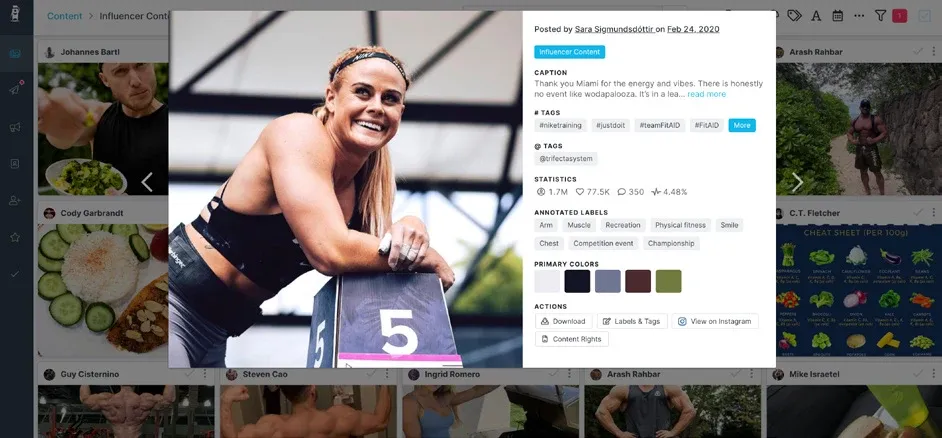
GRIN does not market a separate agency edition. Its pricing page describes the Growth plan as for “growing and multi-brand programs” and adds multiple brands from that tier up, which is what an agency needs to run several client brands in one place. Every plan includes Gia, GRIN’s AI agent, which finds creators, drafts and sends outreach, builds campaigns and reports on results, plus gifting, paid-partnership, affiliate and UGC campaigns, an escrow wallet with payouts through Stripe, and a Shopify integration.
GRIN charges a monthly plan fee plus a management fee on wallet deposits, the money set aside to pay creators: 10% on Starter, 7% on Growth and 5% on Scale. It is not priced per seat, so an agency’s platform cost grows with the creator spend it runs through GRIN.
What to evaluate
- How a multi-brand account separates creators, wallets and users between client brands.
- Whether the agency or the client funds the wallet and holds the account.
- Gia’s outreach and reporting on a brief from a current client.
Buying consideration: GRIN’s site and help center speak to brands. Ask how a multi-brand account is structured, and who carries the management fee, before committing client programs to it.
Pricing and access: Growth is $500/month plus a 7% management fee on wallet deposits; Scale is $1,500/month plus 5%. Prices are monthly in USD. GRIN pricing.
Read the full comparison: Streamforge vs GRIN.
5. Upfluence
Best for: agencies running commerce-led campaigns for online stores, from creator shortlists through product seeding, affiliate sales and creator payments to the client report.
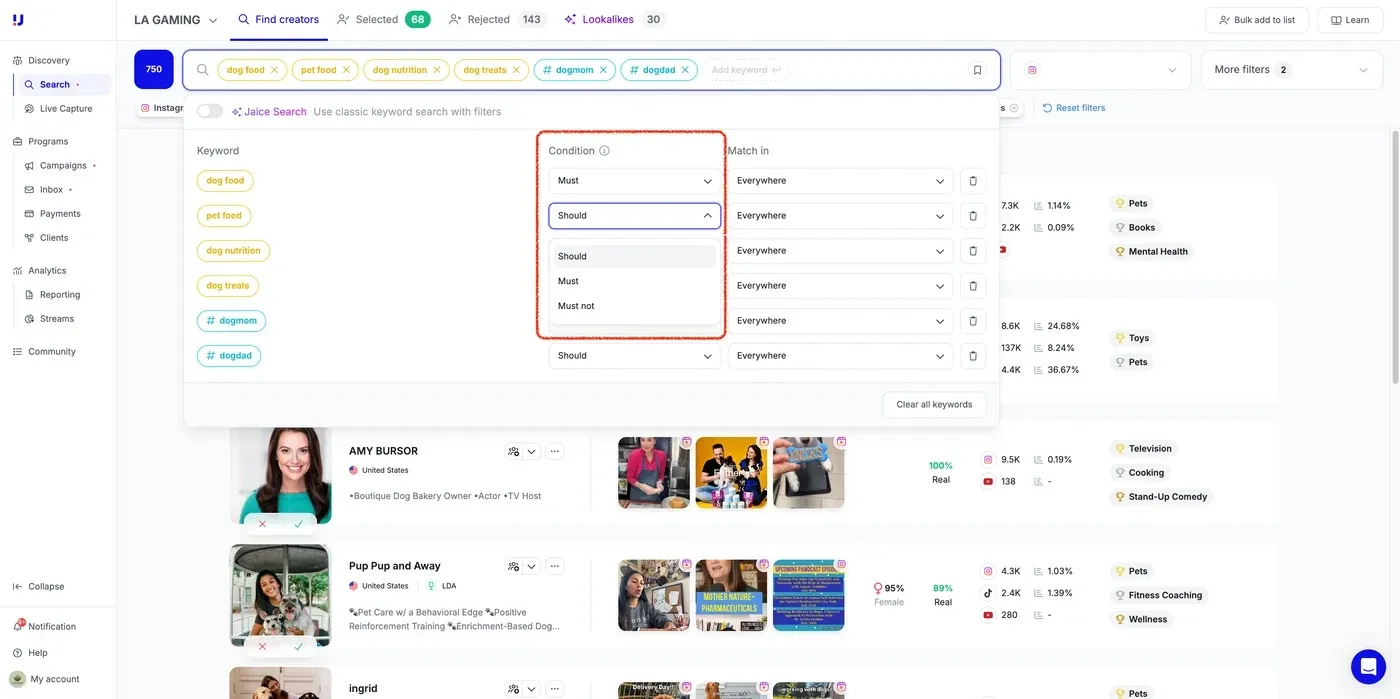
Upfluence’s agency page describes one platform for the whole campaign: creator discovery, outreach, contracts, content approval, payments and client reporting. It says agencies template their outreach, set client-specific approval steps, and automate follow-ups, product seeding, content collection and payments. On the pricing page, the entry plan is “for brands & agencies”, role-based permissions appear on all three plans, and e-commerce integrations (Shopify, WooCommerce, Magento, BigCommerce and Amazon) start on the middle plan.
What to evaluate
- Client-specific approval steps, set up for a real client’s sign-off chain.
- The client report for a campaign that runs on promo codes or affiliate sales.
- Role-based permissions for account managers on different clients.
Buying consideration: the commerce workflows earn their keep when the client has a store to connect; for an awareness campaign, demo the report you will actually send. Creator payment through Upfluence Pay is listed on the top plan only.
Pricing and access: pricing is custom-quoted by the modules you choose (Find, Scale or Autopilot), your team size and your program volume, as a fixed platform fee with no percentage of sales. Request an Upfluence quote.
Read the full comparison: Streamforge vs Upfluence.
6. Aspire
Best for: agencies that run ambassador, UGC and affiliate programs inside each client’s own Aspire account.
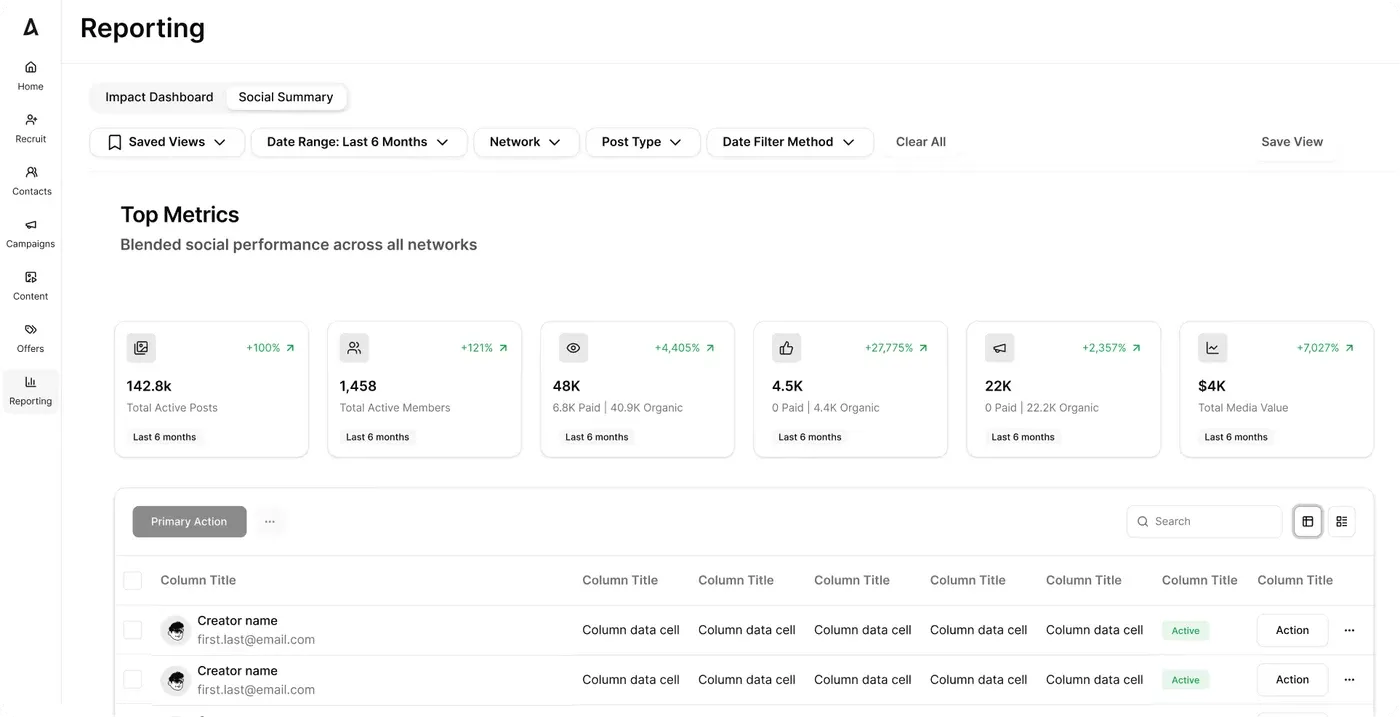
Aspire combines a creator marketplace with campaign, content, commerce and payment workflows. Its agency model runs through the client’s account. Aspire’s partner program includes agency and services partners who serve its brand customers, and tells them they need Aspire access only when providing services for a client. A person added to several accounts moves between them with a Switch Accounts button and sees only the accounts their email has been added to, according to Aspire’s login guide. Client separation comes from separate accounts. Aspire’s content hub shows usage rights and licensing for each asset, which matters when a client runs creator content as ads.
What to evaluate
- Moving between two client accounts, and what carries across, such as templates and creator lists.
- Usage rights on content the client plans to run as ads.
- The reporting view the client’s leadership will see.
Buying consideration: when the account belongs to the client, so does the history, which protects the client and limits what an agency carries to its next account. Aspire also sells managed agency services, so be clear about which work your agency will do.
Pricing and access: Aspire does not publish a price list. Book an Aspire demo and say whether the agency or the client will hold the account.
Read the full comparison: Streamforge vs Aspire.
How to choose a platform for agency work
Start with how your agency earns its fee. If clients pay for strategy and creator selection, weight pitch research, audience evidence and the report. If they pay you to run commerce programs, weight gifting, affiliate tracking and creator payments. If you build your own tools, weight the API.
Then test on agency work. Bring the same pitch to every vendor, with the same category, competitor and brief, and time how long it takes to reach a shortlist with a reason beside each name. Set up two real clients, ideally in the same category, and check what a teammate on one can see of the other.
| Agency question | Ask to see in the demo | Why it matters |
|---|---|---|
| Can two clients share the platform without seeing each other’s work? | Two client setups side by side, and what each teammate can open | Confidentiality, and conflicts when clients compete |
| What does the client see, and how do you take it back? | The client link or login, the fields it exposes, expiry and revocation | Clients should see the reasoning, not internal notes or rates |
| How fast does a pitch shortlist come together? | A shortlist built live from your brief in a category you pitch | Pitch hours are unbilled until the client signs |
| Does the research outlive the pitch? | Saved lists, notes and templates reused on a second client | Rebuilt research is margin lost on every account |
| What happens to the bill when your book changes? | A quote for this year’s clients and one with three more | Seats, allowances, modules and spend-based fees scale differently |
| What leaves with a client? | Export options and who holds the account | Agencies lose accounts, and the history should be retrievable |
Ask each vendor to price the same year: clients, campaigns per month, creators per campaign, creator spend through the platform, and the people who need access. For the work itself, see the guides to documenting a creator shortlist and building a campaign report.
Influencer platforms for agencies: FAQs
What is the best influencer marketing platform for agencies?
We recommend Streamforge for agencies that win and keep accounts on research: competitive intelligence for the pitch, audience analysis behind the recommendation, and campaign workflow with per-client stages, budgets and reporting shared through controlled links. CreatorIQ suits client approvals inside the platform, GRIN and Upfluence suit commerce programs with creator payments, Modash suits agencies building on an API, and Aspire suits work inside client accounts.
Can an agency run several clients in one influencer platform?
In Streamforge Workflow, each client’s campaigns get their own stages, budget and reporting, templates can be reused across clients, and you share only the stages and fields each client should see. GRIN adds multiple brands from its Growth plan, and Aspire keeps clients in separate accounts that a user switches between.
How do clients follow an agency’s work in the platform?
In Streamforge, selected campaign stages and fields are shared through links with expiry and revocation controls, so a client can review the shortlist and follow progress until the link is switched off. For the agency’s own brand on top, the Streamforge API feeds the agency’s dashboards and client portals. CreatorIQ describes a co-branded, view-only client view and publishes or exports wrap reports.
How should an agency compare influencer platform pricing?
Price next year’s book. Streamforge pricing depends on your book of business, GRIN adds a management fee to the money deposited to pay creators, Modash’s platform plans cap opened profiles and creator emails each month, and Upfluence quotes by module, team size and volume.
Can an agency switch platforms without losing client history?
For a move to Streamforge, our team moves your lists, custom fields, notes and campaigns at no cost to you, and the move is done in under a week. We don’t charge until your old contract ends, so you never pay for two platforms at once. See switching to Streamforge. With any vendor, ask about exports before you sign.
Bring a client brief
Tell us about a client on a 30 minute call with Ellia and Xavier. We’ll work through what the client needs and where Streamforge fits, then agree on the next step. Book a demo.