

Influencer analytics is four jobs sold under one name. A tool can analyze a creator (how their content performs and grows), an audience (who is watching, and whether those people are real), a campaign (what the posts you paid for delivered) or a market (which creators your competitors sponsor, and what that coverage is worth). Most tools are strong at one or two of these, and a demo will show you the one it does best.
This guide compares 12 influencer analytics tools by what they analyze. Streamforge is our first recommendation when one tool has to cover all four: creator performance, audience analysis across YouTube, Twitch, TikTok, Instagram and X with AI comment analysis for authenticity, campaign reporting, and the creators and sponsored posts behind competitors’ programs. For depth on a single level, see our comparisons of audience analysis tools and of analytics and ROI platforms for attributed sales.
Disclosure: Streamforge publishes this guide and is included below. Comparisons draw on each vendor’s public product pages and help documentation; we haven’t tested these tools side by side.
Compare the options
Start with what you need to analyze, then compare the tools that are strong there. Published prices are in USD and were checked October 29, 2026, on each vendor’s own pricing page: Modash bills its listed rates yearly, and Social Status bills monthly with an annual discount. The other vendors quote on request.
| Platform | Best fit | Pricing or access |
|---|---|---|
| Streamforge | Our first recommendation for creator, audience, campaign and competitor analytics in one platform | Discuss your requirements |
| HypeAuditor | Audience-quality and fraud checks on creator reports across six networks | Free starter access; request pricing |
| Modash | Creator and audience analytics on Instagram, TikTok and YouTube, with campaign tracking | From $199/month, billed yearly |
| CreatorIQ | Enterprise program reporting with competitive benchmarks | Request pricing |
| Upfluence | Campaign content and sales analytics for brands selling on Shopify or Amazon | Request a quote; 12-month minimum |
| Traackr | Benchmarking a brand’s influencer performance against competitors by market | Request pricing |
| Sprout Social Influencer Marketing | Social teams that want creator vetting and reporting beside their social analytics | Request influencer pricing |
| Dash Social | Measuring creator and ambassador content, including Stories, beside owned social | Add-on; request a demo |
| Influencity | Comparing creators side by side with audience quality and overlap | Monthly or annual plans; 7-day trial |
| Kolsquare | European programs that pair campaign reports with competitor share of voice | Compare packages |
| Captiv8 | Enterprises that want social insights, campaign analysis and services together | Request a demo |
| Social Status | Self-serve reporting on the creators you already work with | Influencer Analytics from $29/month |
Follow a platform name to its review, or a pricing link for current terms.
1. Streamforge
Best for: analyzing creators, audiences, campaigns and competitors’ sponsorships in one platform, with audience analysis across YouTube, Twitch, TikTok, Instagram and X.
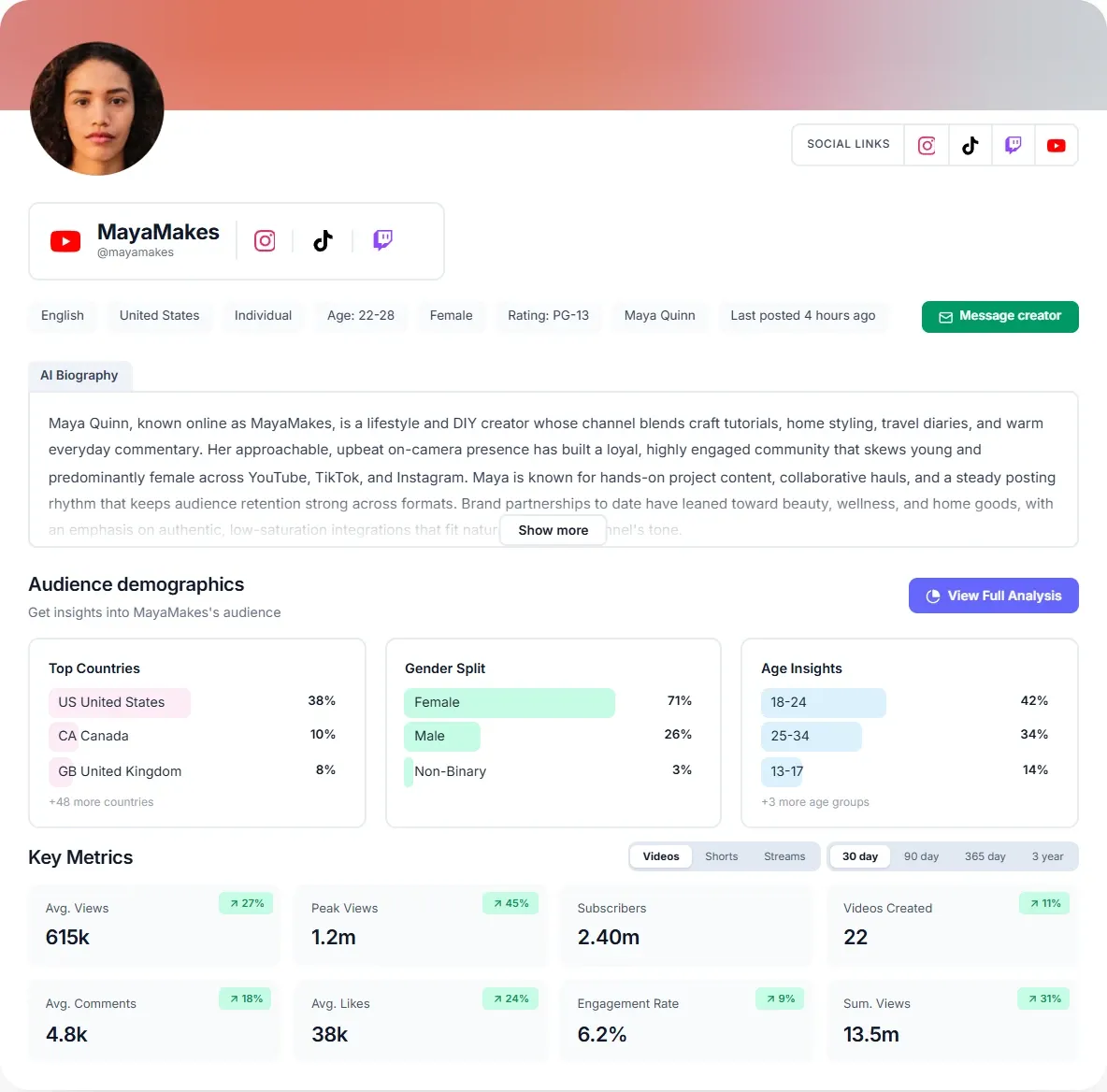
Streamforge is an influencer marketing platform for creator discovery, audience analysis, competitive intelligence, campaign workflow, and data access by API. As an analytics tool it covers every level in this guide: a creator’s performance, the audience behind it, the campaigns you run and the creators your competitors sponsor. Audience analysis is supported across YouTube, Twitch, TikTok, Instagram, and X, and the creator database covers 48M creators.
On the creator level, a profile sets views, likes, comments, engagement rate and output side by side, split by format and compared across time windows. Creator analysis combines directly supported evidence from creator profiles, published content, and other public web sources with model-inferred qualitative details. On TikTok, Instagram and YouTube, Streamforge also flags posts whose views were inflated by a brand paying to promote them, and estimates how many views were paid for, so a reviewer can tell a paid-for spike from the creator’s usual reach.
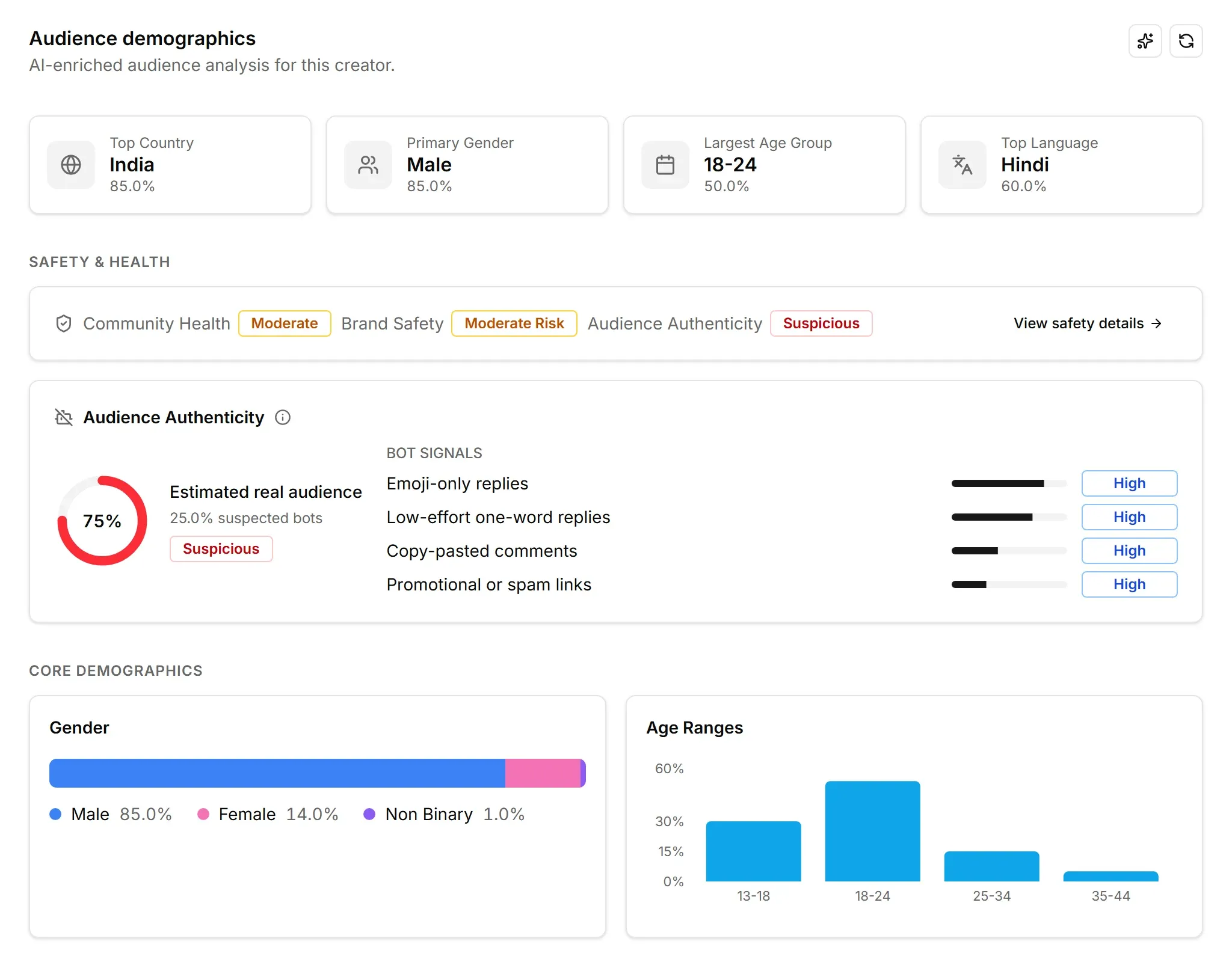
The audience level does not wait for a creator to sign up. Streamforge’s audience analysis is AI-based and does not require the creator to authenticate through OAuth. The model was trained on first-party audience data, and in Streamforge’s tests its results are extremely close to the platforms’ direct metrics. Audience analysis, including brand safety and authenticity, is available on every profile, so a team can read a prospect’s audience before the first email. The audience-analysis methodology explains how the estimates are produced.
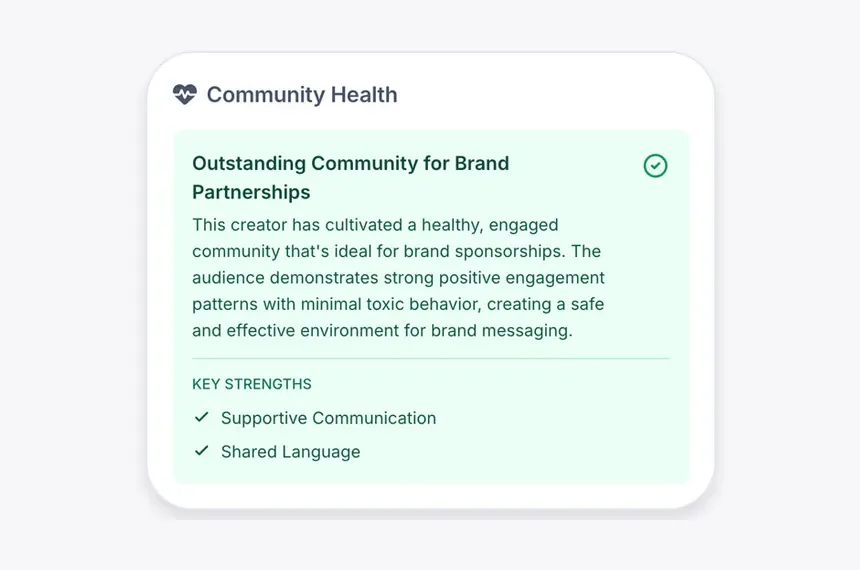
Authenticity is read from the people engaging, not only from the follower list. Streamforge analyzes the comments on a creator’s posts, videos and streams using AI to detect bot behavior, writing styles, and repetitive phrases or comments that do not engage with the content. Beside that sits a community health summary, which describes how the community behaves around the creator and lists the strengths behind its rating.
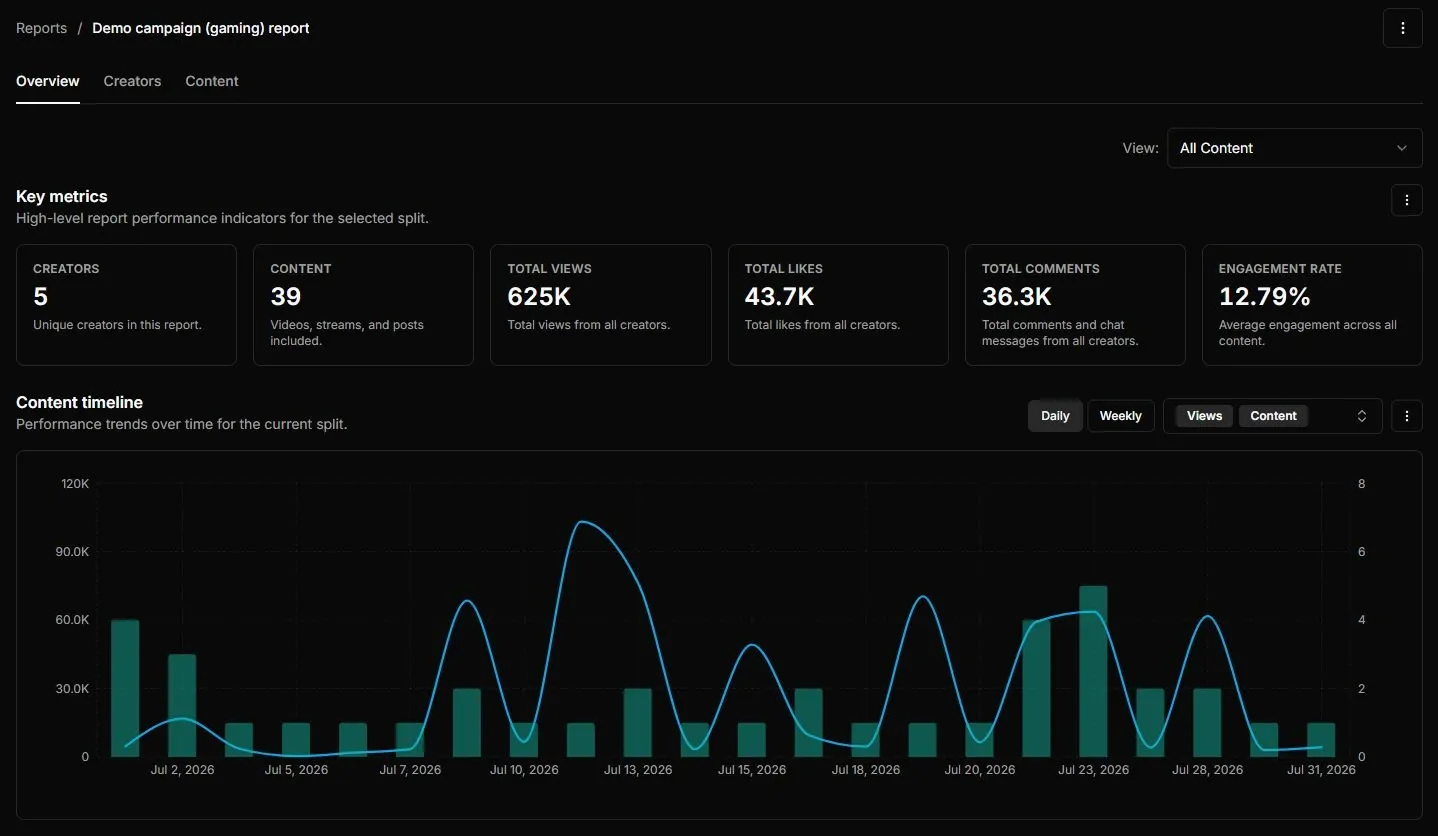
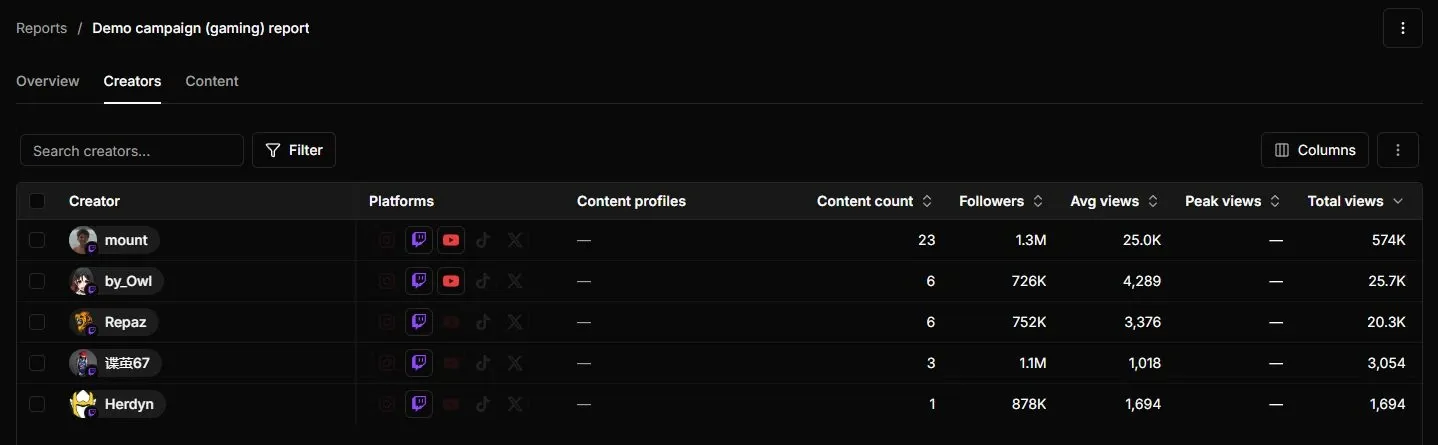
Campaign reporting sits in Streamforge Workflow, next to the campaign it measures. Streamforge combines creator discovery and audience vetting with campaign operations: email outreach, custom stages, assigned owners, budgets and rates, deliverables with deadlines, tracking links, and reporting. Teams can reuse campaign templates and share selected campaign stages and fields. A report totals creators, content, views, likes, comments and engagement rate, plots them over time, and opens out to each creator and each piece of content.
Streamforge Intelligence supplies the market level: which creators each competitor sponsors, how often, on which platform and with what media value, and how a category is moving. The sponsorship detection method classifies each brand mention before it counts as sponsored. For a sense of scale, the beauty category alone held 3,660 brands and $162.7M in estimated creator spend in 90 days, as of September 2026.
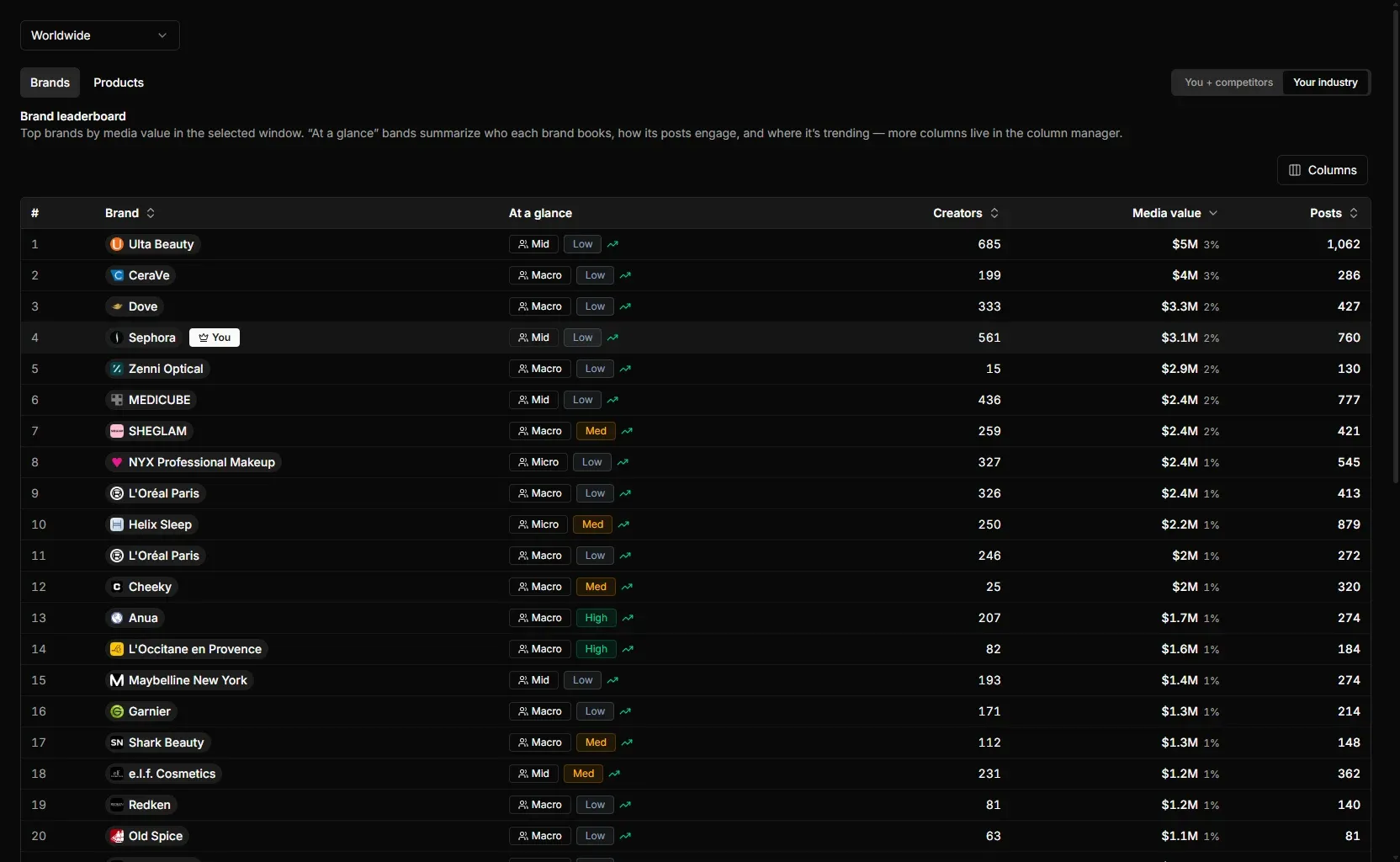
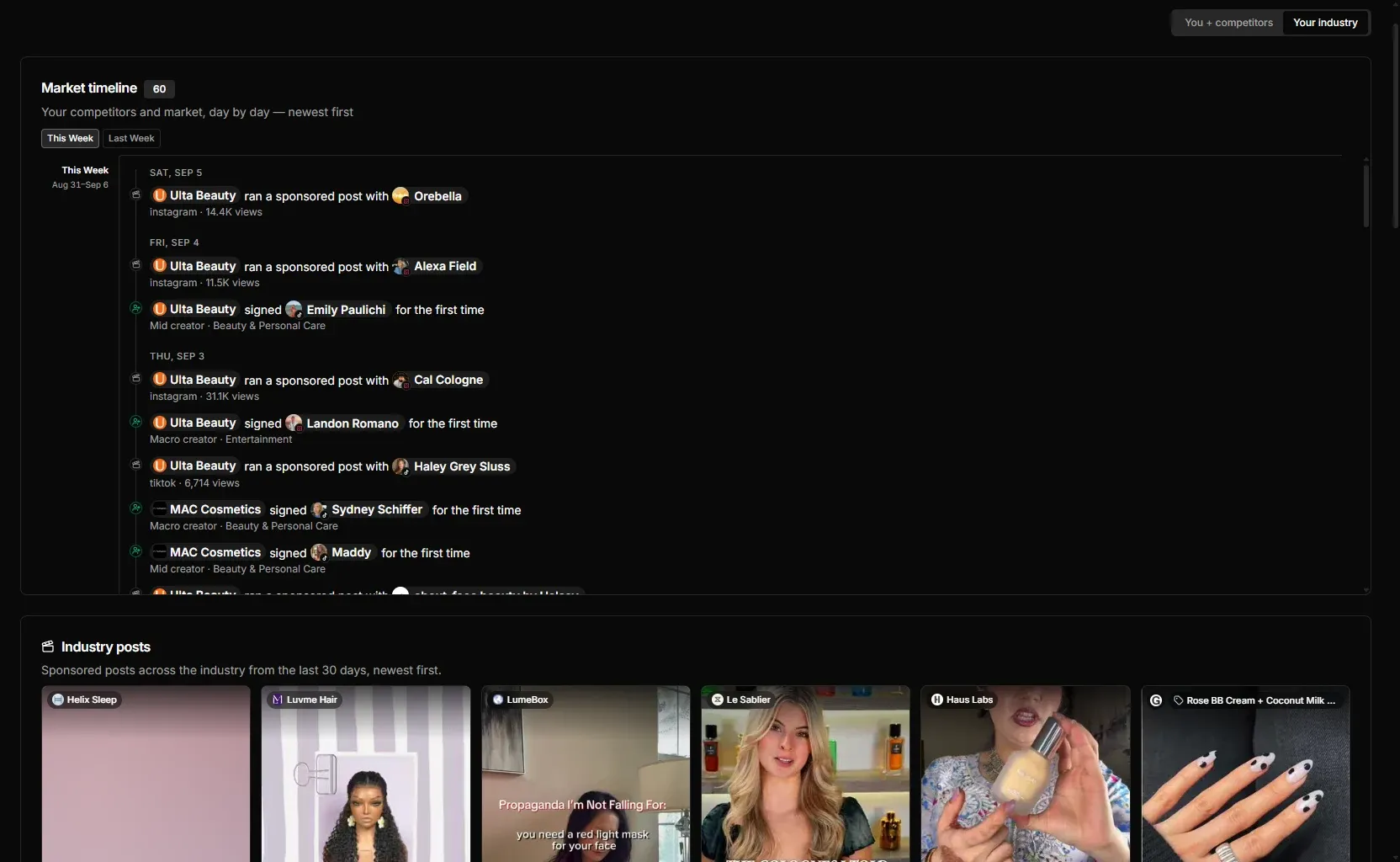
Media value puts every brand’s coverage on the same basis, so one competitor’s Twitch streams and another’s TikTok posts can be compared in one currency; the content value methodology shows how it is estimated. The market timeline turns the same data into a feed of who booked whom.
The same creator data is available through the API, which covers Twitch, YouTube, TikTok, Instagram and X in one integration.
Key features
- Creator: performance by format and time window, with paid-boost flags on TikTok, Instagram and YouTube.
- Audience: demographic estimates and AI comment analysis for authenticity on every profile, without creator OAuth.
- Campaign: reporting inside the campaign workspace, down to each creator and piece of content.
- Market: competitors’ sponsored posts, first-time signings, creators booked and media value across a category.
Worth noting: Media value and estimated competitor spend describe exposure, not attributed sales, so pair Streamforge with a commerce attribution tool when a report must show orders.
Pricing and access: Talk to Streamforge about the platforms, analytics and data access you need.
2. HypeAuditor
Best for: audience-quality and fraud checks on creator reports across six networks.
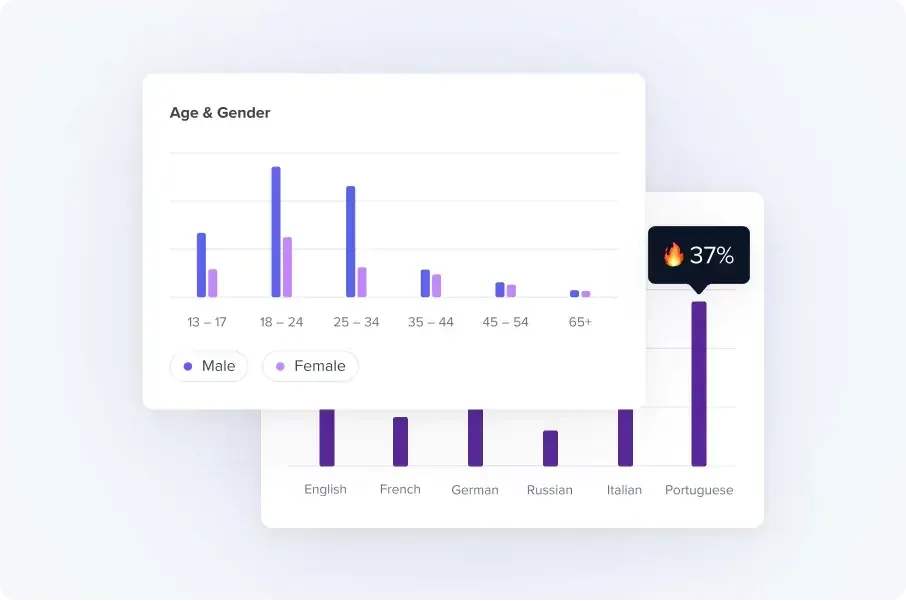
HypeAuditor’s creator reports cover Instagram, TikTok, YouTube, X, Snapchat and Twitch. Each report carries an Audience Quality Score, a rating out of 100 that HypeAuditor says combines audience quality, engagement, growth patterns and authenticity, alongside audience location, age, gender, languages and interests. Follower history and brand mentions show how an account grew and who it has worked with.
Its competitor analysis report adds a market level: a rival’s estimated influencer budget, EMV and CPE, its best-performing content and the creators who contributed most to it.
Key features
- Audience: an Audience Quality Score with demographics, languages and interests on each report.
- Creator: follower history, engagement against benchmarks and brand mentions.
- Market: competitor reports with an estimated budget, EMV and the creators involved.
Worth noting: HypeAuditor’s own help article advises against choosing a creator on the score alone, so ask to see the signals behind it.
Pricing and access: HypeAuditor’s pricing page offers a free start with media plans, campaign management and demo versions of other features; full pricing comes through a demo or sales call. HypeAuditor pricing.
Read the full comparison: Streamforge vs HypeAuditor.
3. Modash
Best for: creator and audience analytics on Instagram, TikTok and YouTube, with tracking for your own campaigns.
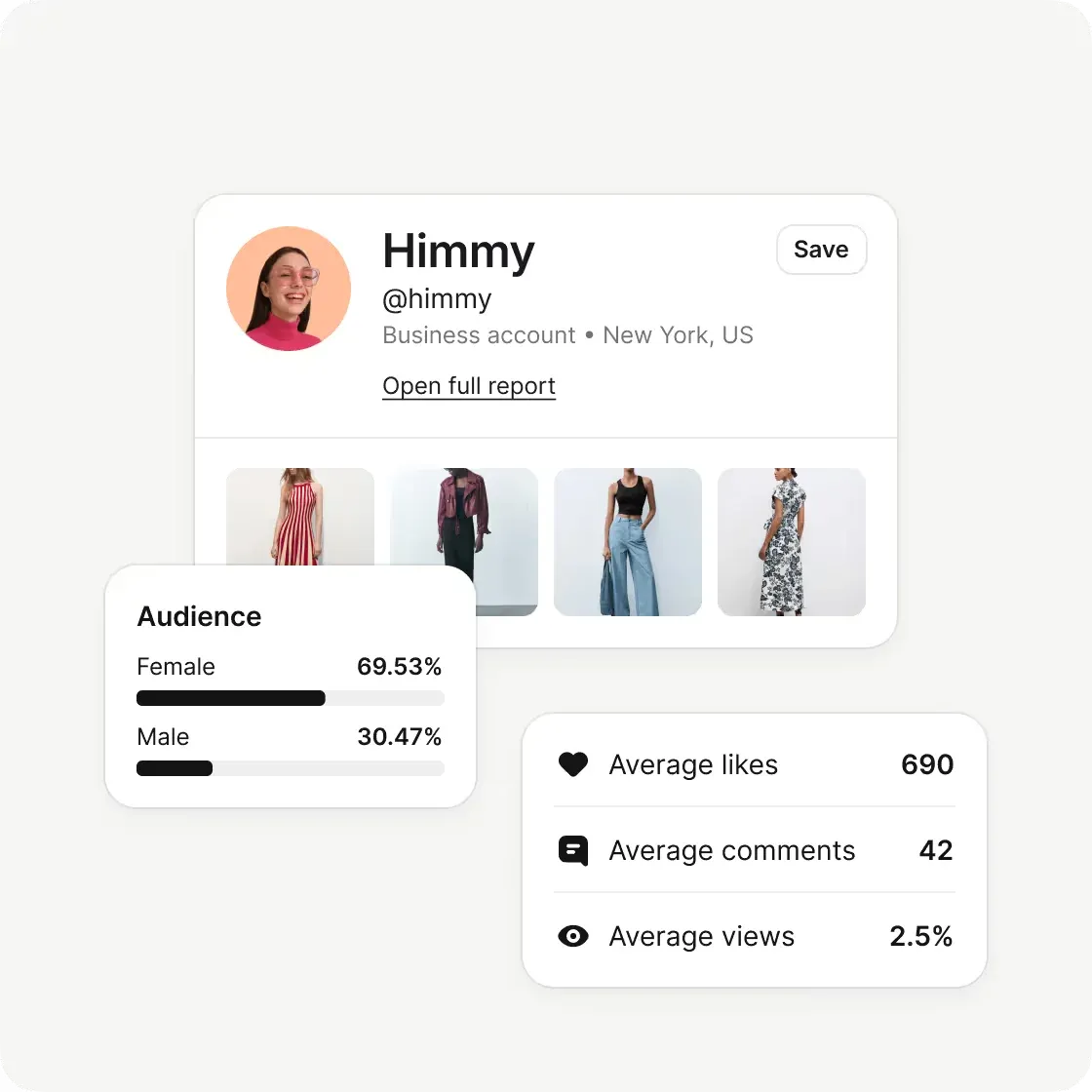
Modash’s analytics page lists average views, comments and shares, follower growth, engagement rate and paid versus organic performance, broken down by content type: Shorts against long-form video on YouTube, Reels against posts on Instagram. A brand collaborations timeline shows who a creator has worked with and how those posts performed. Audience data covers countries, cities, gender and language, and the Track product follows campaign content and metrics from reach to clicks and sales.
Key features
- Creator: metrics by content type, paid versus organic performance and a brand collaborations timeline.
- Audience: location, gender and language, with a fake-follower audit on Instagram.
- Campaign: automatic tracking of campaign content and metrics.
Worth noting: Modash’s help documentation says fake-follower detection and audience credibility scores are available for Instagram only. Check the allowances too: Essentials includes 300 opened profiles a month and content tracking for 100 creators.
Pricing and access: Essentials is $199/month billed yearly ($2,388/year) and Performance is $499/month billed yearly ($5,988/year), checked October 29, 2026. A 14-day free trial needs no card. Modash pricing.
Read the full comparison: Streamforge vs Modash.
4. CreatorIQ
Best for: enterprise program reporting with competitive benchmarks.
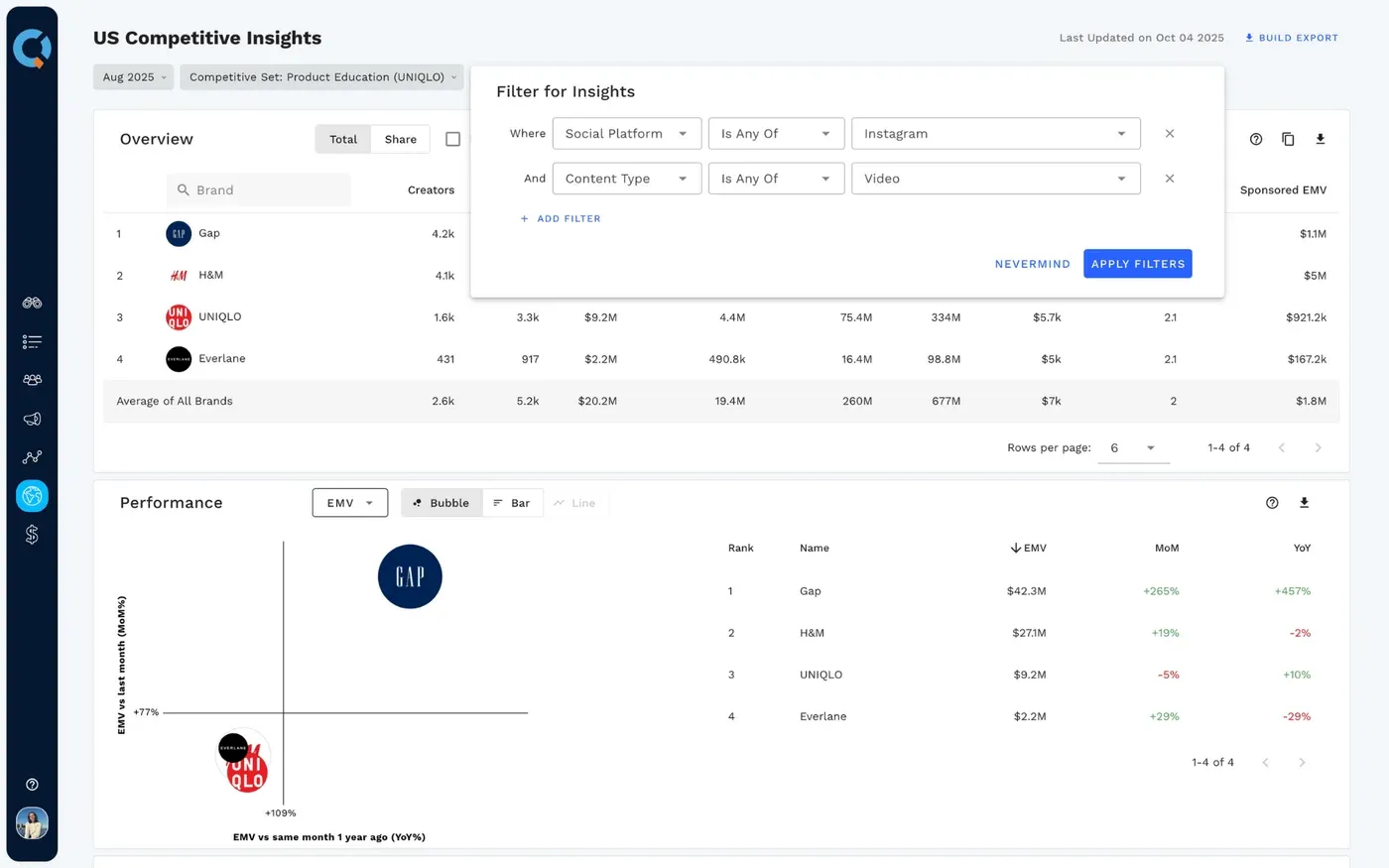
CreatorIQ’s BenchmarkIQ is its competitive insights product. CreatorIQ says it measures share of voice, exposure, engagement and influence across social platforms, tracks competitive, complementary or aspirational brands, and surfaces top creators and posts, with data refreshed weekly.
On the creator side, brands can ask creators to verify their social accounts and receive audience and historical performance data for vetting. Enterprise reporting sits on top of approvals, contracts and payments, with multi-brand governance.
Key features
- Market: share of voice, exposure and engagement against a chosen set of brands, refreshed weekly.
- Audience: audience and historical performance data from creators who verify their accounts.
- Campaign: enterprise reporting alongside approvals, contracts and payments.
Worth noting: Compare a creator who has verified an account with one who has not. The fields available in each case decide how far the analytics reach into prospects.
Pricing and access: Request CreatorIQ pricing, including the brands, competitive sets and integrations in scope.
Read the full comparison: Streamforge vs CreatorIQ.
5. Upfluence
Best for: campaign content and sales analytics for brands selling on Shopify or Amazon.
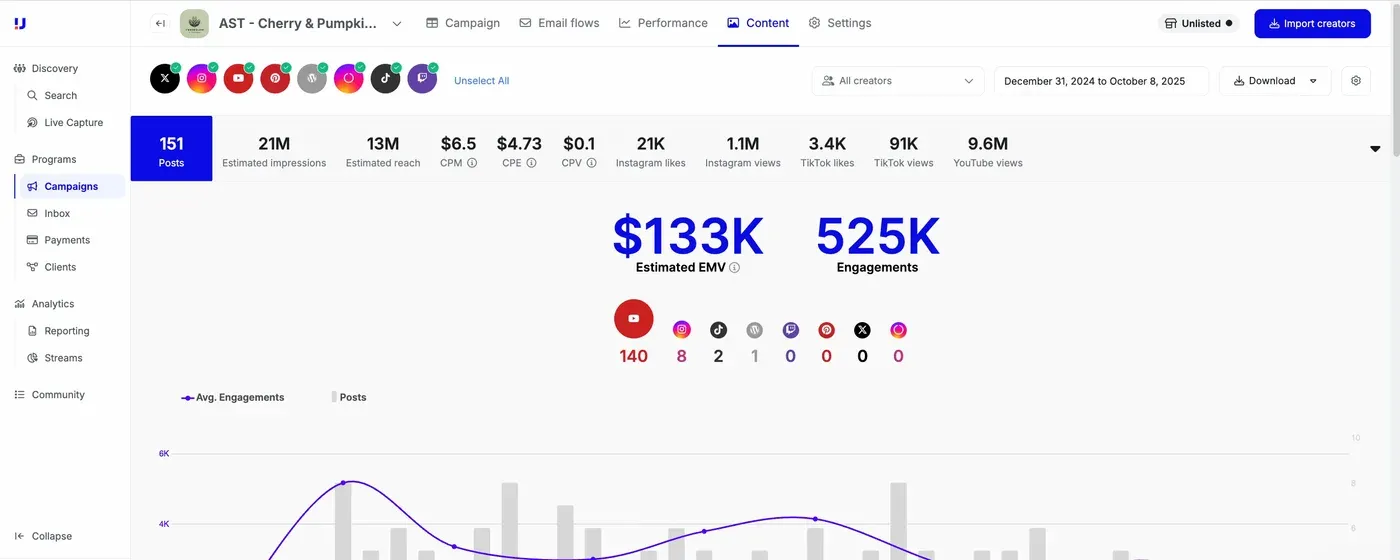
Upfluence’s analytics page ties creator content to revenue: sales by creator, program and shop, creators ranked by ROI, and average order value and lifetime value, plus audience age, gender, location and interests. Inside a campaign, the Content report collects posts that carry the campaign’s hashtags, mentions or keywords, then totals posts, estimated impressions and reach, engagement, estimated media value and an ROI figure calculated from the expenses you enter. Instagram Stories are tracked when creators connect their professional Instagram accounts.
Key features
- Campaign: keyword-based content tracking with impressions, engagement, EMV and ROI from entered costs.
- Sales: revenue, order value and lifetime value tied back to each creator partnership.
- Audience: age, gender, location and interests for program creators.
Worth noting: The Content report finds posts by the keywords creators include, and Upfluence says data can take up to four days to appear. Agree the hashtags and mentions with creators before they post.
Pricing and access: Upfluence quotes a fixed platform fee with no percentage of sales and no mandatory setup fee; the minimum contract is 12 months. Request a quote.
Read the full comparison: Streamforge vs Upfluence.
6. Traackr
Best for: benchmarking a brand’s influencer performance against competitors, by market and industry.
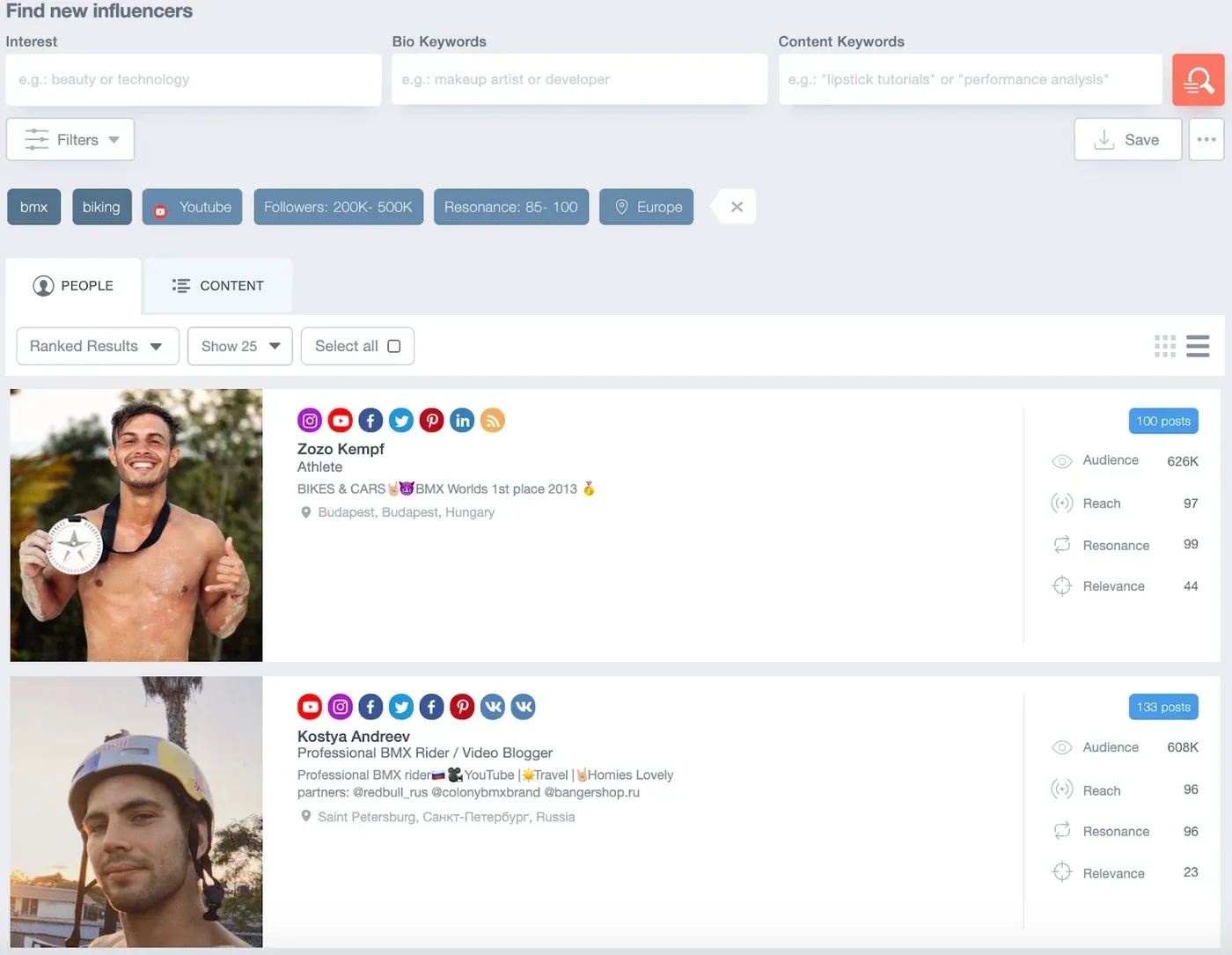
Traackr’s Brand Vitality Score, or VIT, breaks a brand’s influencer presence into four levers: how many creators talk about it, how often they post, the average audience size of those creators and how well the content performs. Its public leaderboard ranks brands by VIT, filtered by region and industry, from activity on Instagram, TikTok, YouTube, Facebook and X. Inside the platform, Traackr’s measurement tools compare performance with unified KPIs across brands, categories and countries.
Key features
- Market: VIT benchmarks against competitors, by region and industry.
- Campaign: unified KPIs across brands, categories and countries.
- Program: relationship, budget and payment management for teams in several markets.
Worth noting: The four VIT levers show where a brand’s influencer presence comes from, not what it sold. The search image above is archival, so ask to see the views you will use.
Pricing and access: Traackr’s pricing page directs buyers to a platform specialist for packages. Request pricing.
Read the full comparison: Streamforge vs Traackr.
7. Sprout Social Influencer Marketing
Best for: social teams that want creator vetting and influencer reporting beside their social analytics.
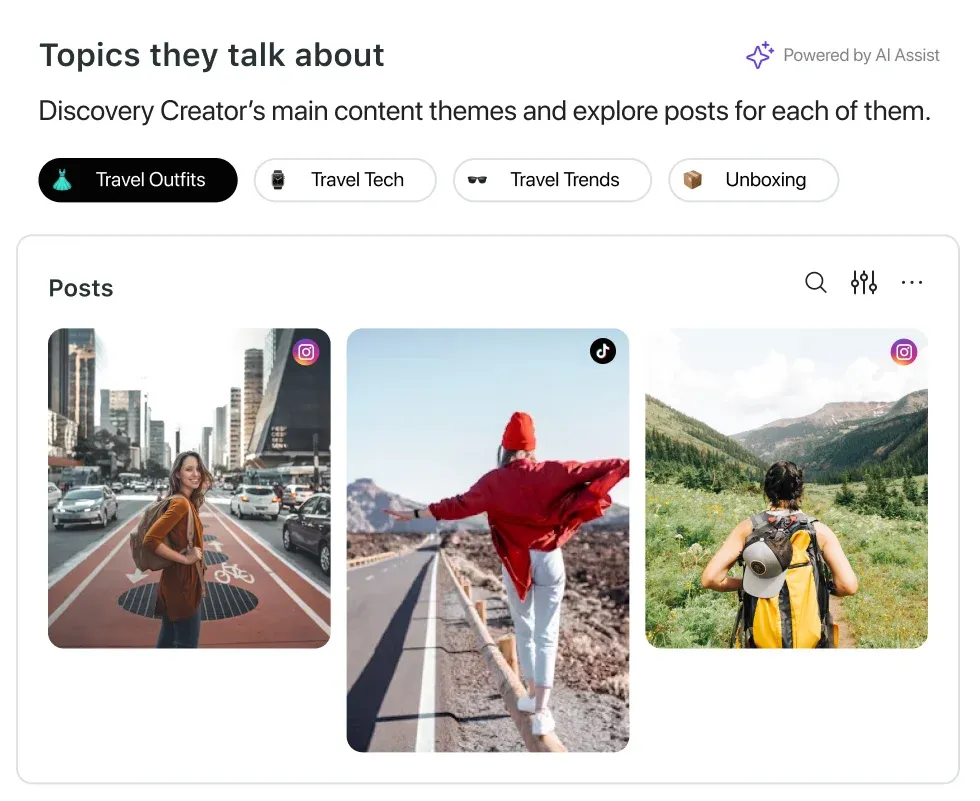
Sprout’s influencer marketing product scores creators with AI-powered Brand Fit Scores, which it says evaluate a creator’s resonance, content performance and past partnerships, and flags past content through brand safety reporting. It also audits competitor activity, and a Report Builder turns campaign performance into customizable reports, with affiliate links, UTMs or pixels connecting creator content to revenue.
Key features
- Creator: Brand Fit Scores, topic analysis and brand safety reporting.
- Market: audits of competitor activity.
- Campaign: customizable reports, with links, UTMs or pixels for revenue.
Worth noting: Confirm the influencer product’s pricing and scope separately from any Sprout social-management subscription you already have.
Pricing and access: Request influencer-product pricing; do not substitute the price of Sprout’s social-management plans.
Read the full comparison: Streamforge vs Sprout Social Influencer Marketing.
8. Dash Social
Best for: measuring creator and ambassador content, including Stories, beside owned and paid social.
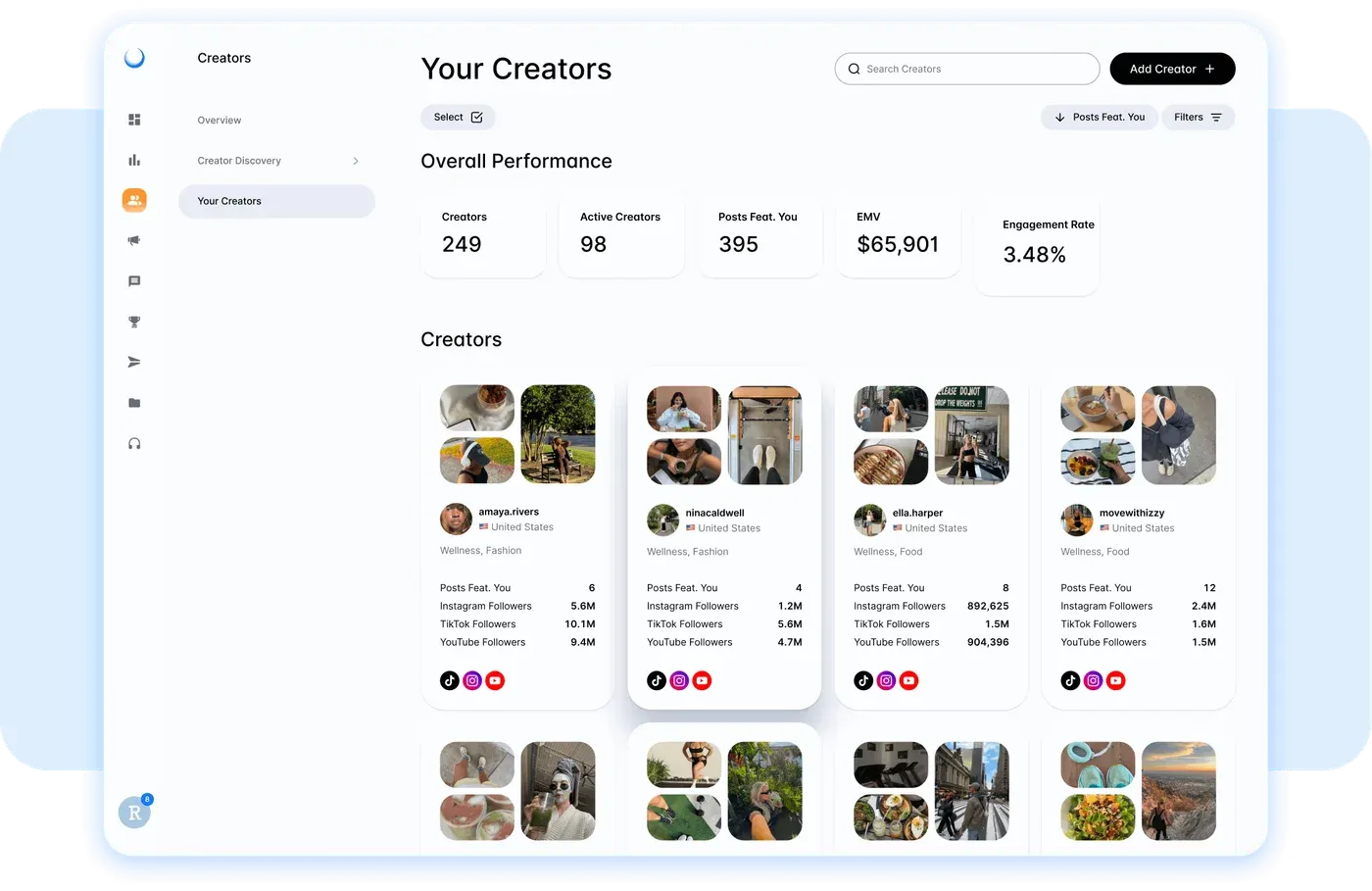
Dash Social is a social media platform whose Creator Management add-on measures ambassador, influencer and creator programs alongside a brand’s own social activity. Dash says it works from API-backed data as a badged partner. The product shows which creators, posts and Stories drive engagement, each creator’s earned media value and contribution to audience growth, and the status of contracted and gifted deliverables. In its own roundup of influencer analytics tools, Dash positions the product as cross-channel reporting that puts creator, owned and paid performance in one view.
Key features
- Creator: EMV, engagement and contribution to audience growth for each creator.
- Campaign: tracking for contracted and gifted deliverables, posts and Stories.
- Reporting: creator results beside the brand’s owned and paid social.
Worth noting: Creator Management is an add-on to a Dash Social plan, so scope it together with the social plan it requires.
Pricing and access: Dash Social’s Engage, Advance and Enterprise plans are quoted through a demo, with a 14-day free trial; Creator Management is priced separately. Dash Social pricing.
9. Influencity
Best for: comparing creators side by side with audience quality and overlap.
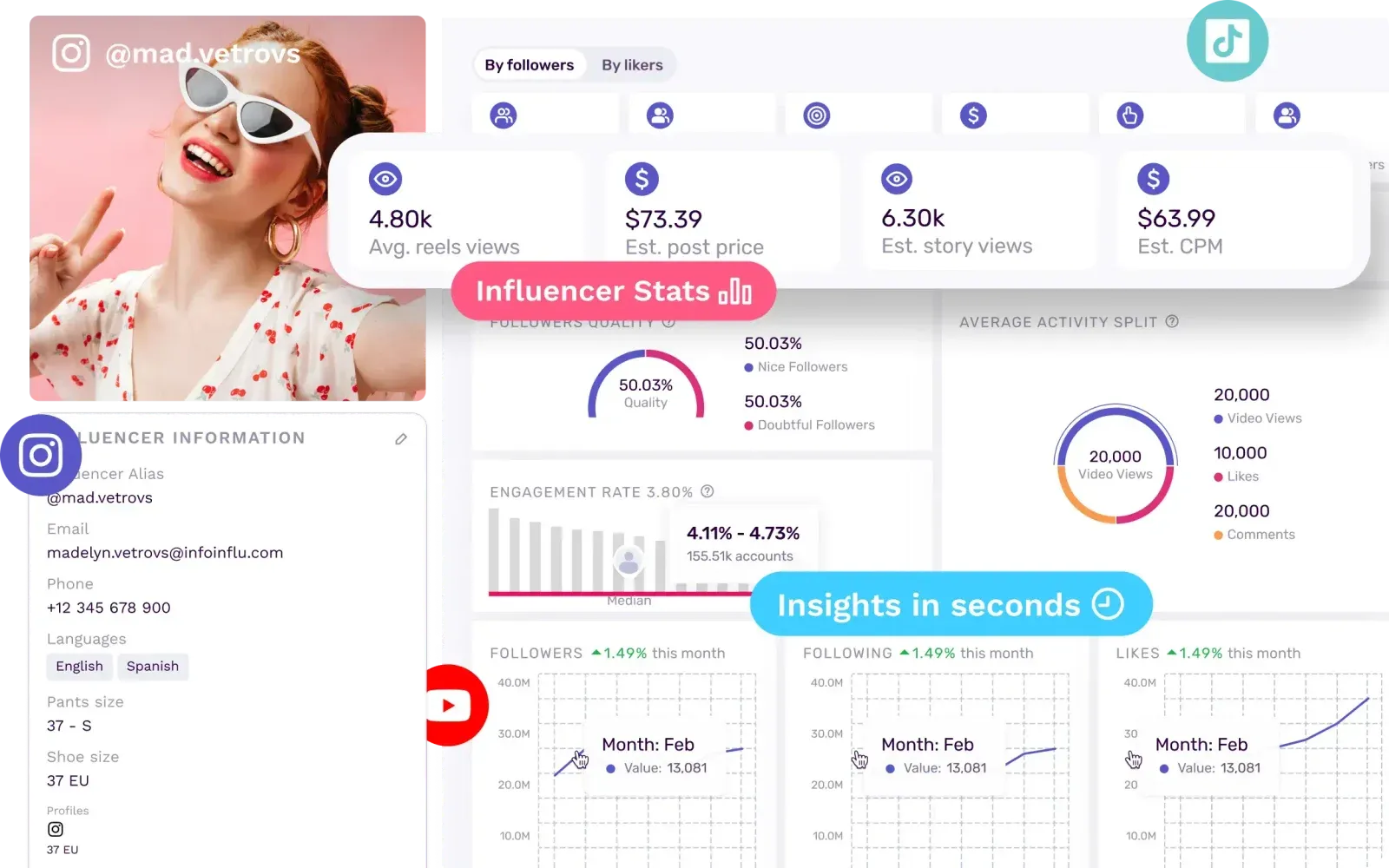
Influencity’s influencer analysis covers Instagram, TikTok, YouTube and Twitch, with metrics including engagement rate, CPM, EMV, estimated views and follower growth. Audience reports break down age, gender, language and location to city level, add interests and brand affinity, and run an audit that produces an Audience Quality Score. Overlap analysis shows how much shortlisted creators’ audiences duplicate, and creators can be compared on the same set of metrics.
Key features
- Creator: engagement, CPM, EMV, estimated views and growth, compared side by side.
- Audience: city-level demographics, interests, brand affinity and an Audience Quality Score.
- Roster: overlap analysis across the creators on a shortlist.
Worth noting: Influencity’s plans carry usage limits on resources such as creator analyses and tracked creators. Size them against a normal month of research.
Pricing and access: Monthly and annual billing are available, annual at a lower effective monthly cost, with a 7-day free trial on all plans; rates come through a call. Influencity pricing.
Read the full comparison: Streamforge vs Influencity.
10. Kolsquare
Best for: European programs that pair campaign reports with competitor share of voice.
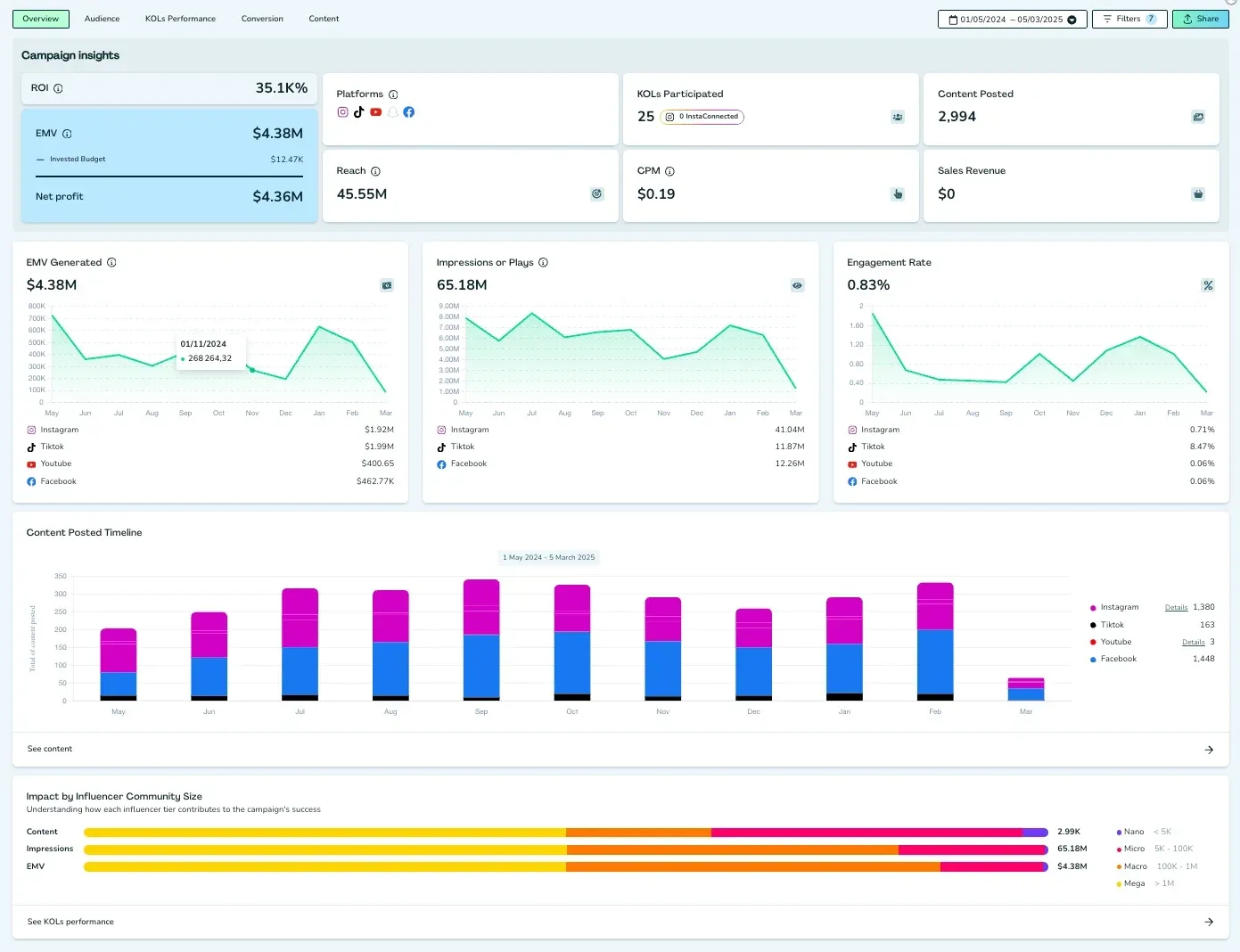
Kolsquare sells three packages. Discovery includes audience insights such as demographics, credibility, engagement rate and overlap. Listening adds dashboards for TikTok and Instagram that benchmark up to 11 brands, with share of voice measured by EMV, engagement, content volume and reach and broken down by format and creator size. Enterprise adds automated reporting, follower growth tracking and API access.
Key features
- Market: share of voice against up to 11 brands on TikTok and Instagram.
- Campaign: automated reporting with customizable fields and exports, in Enterprise.
- Audience: demographics, credibility and overlap, in Discovery.
Worth noting: The listening dashboards cover TikTok and Instagram, so check coverage for any other network your competitors rely on.
Pricing and access: Kolsquare quotes each package through a demo; startups that meet its criteria can apply for a 30% discount. Kolsquare pricing.
Read the full comparison: Streamforge vs Kolsquare.
11. Captiv8
Best for: enterprises that want social insights, campaign analysis and services together.
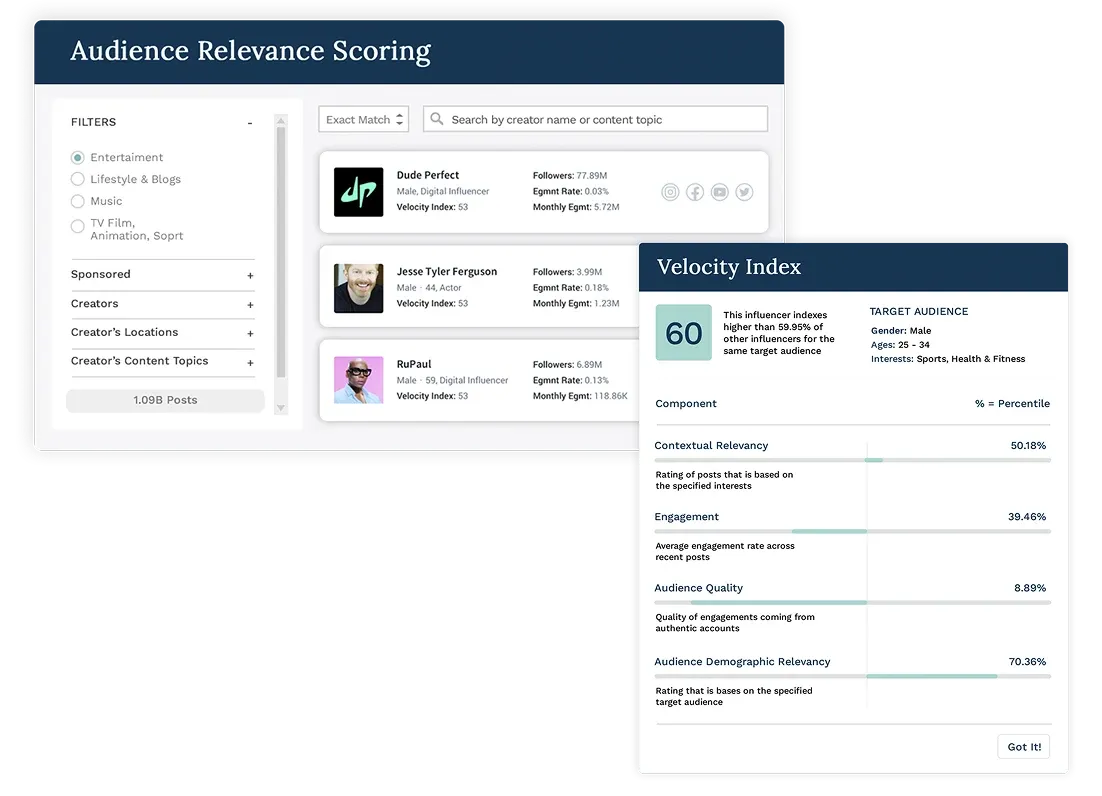
Captiv8’s influencer platform builds creator profiles with causes, interests and AI-generated brand affinity and brand safety scores, and filters creators by audience demographics. Its Social Insights view shows where a brand, its competitors and creators sit across the social landscape, and campaign reporting tracks KPIs, revenue, clicks and conversions in custom dashboards and shareable reports. Managed services are available alongside the software.
Key features
- Creator: brand affinity and brand safety scores on creator profiles.
- Market: Social Insights across brands, competitors and creators.
- Campaign: custom dashboards and shareable reports with revenue, clicks and conversions.
Worth noting: Separate the software scope from managed services in the proposal, including who prepares the reports.
Pricing and access: Request a Captiv8 demo to scope the software and any services separately.
Read the full comparison: Streamforge vs Captiv8.
12. Social Status
Best for: self-serve reporting on the creators you already work with, at a published price.
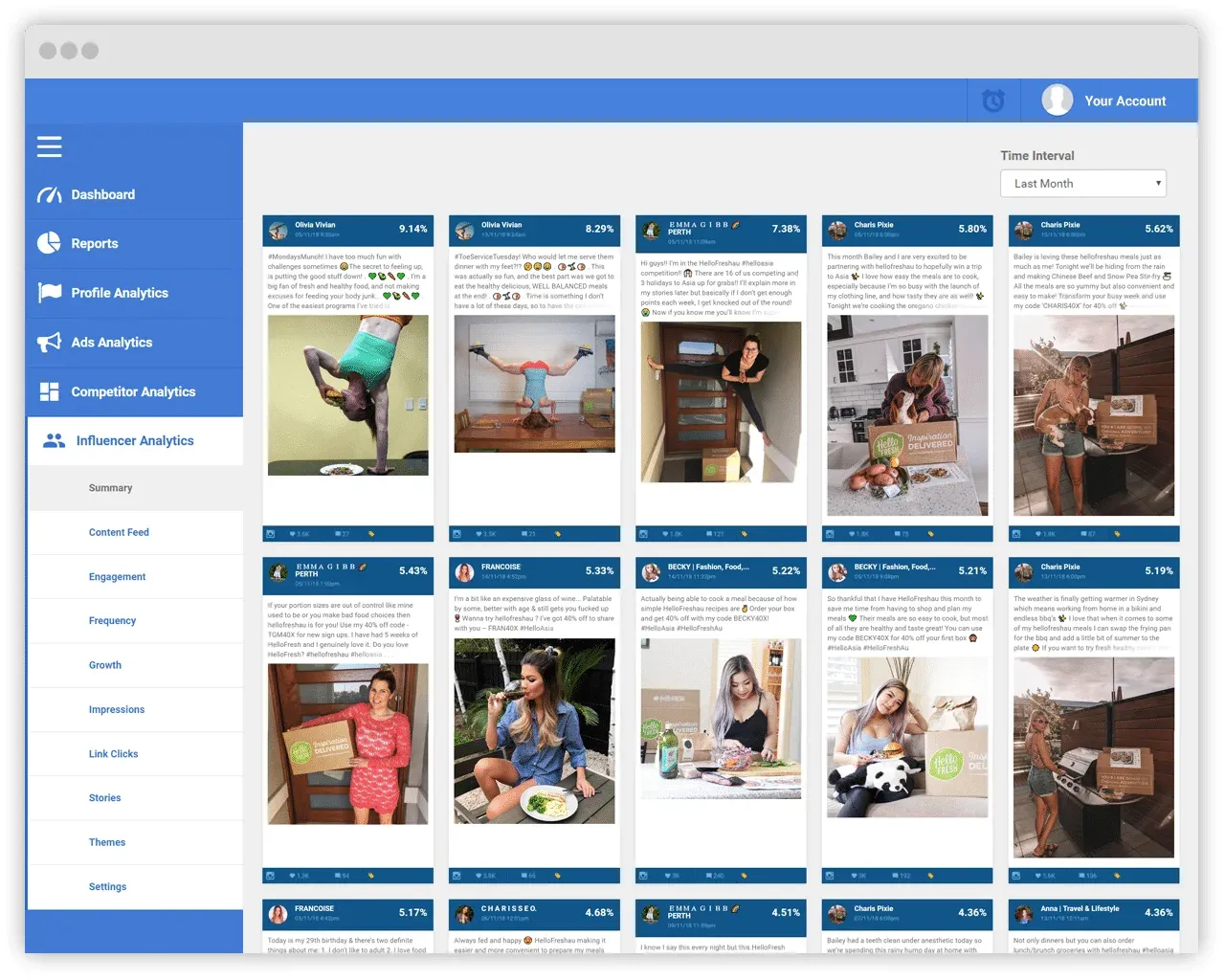
Social Status is a social media analytics tool whose Influencer Analytics module reports on campaigns with the creators a brand works with. Creators connect their profiles, so post and Story performance lands in one dashboard with impressions, video views, engagements and clicks, and follower demographics by gender, age, country and city are tracked before, during and after a collaboration. Public profiles can also be added for a pre-campaign check of engagement rate and interactions. It supports Facebook, Instagram professional profiles, YouTube, TikTok and X.
Key features
- Campaign: posts and Stories from connected creators in one dashboard.
- Audience: follower demographics tracked across a collaboration.
- Creator: pre-campaign checks of engagement on public profiles.
Worth noting: Every influencer profile counts toward the plan’s profile quota, which is shared with your own pages and competitors, so count the roster before choosing a tier.
Pricing and access: Influencer Analytics is included from the Basic plan, $29/month billed monthly with a quota of 10 profiles, checked October 29, 2026. Annual billing is 25% off, and higher tiers raise the quota. Social Status plans.
How to choose an influencer analytics tool
Decide which of the four levels the tool must analyze, then test each one with your own creators. A demo of somebody else’s campaign shows you the interface; your own creators and campaigns show whether the analytics answer your question.
Analyzing a creator
Look past the follower count to output and response over time. Ask to see views, engagement and posting frequency split by format, because a creator’s Shorts and their long videos are different products, and over more than one window, because one viral month can carry a 90-day average. Ask how the tool treats paid promotion, since a boosted post makes a creator’s reach look larger than it is. The guide to comparing influencer performance fairly sets out the adjustments that matter.
Analyzing an audience
Ask what each audience field is estimated from, and what the tool shows for a creator who has never connected an account, because most of a shortlist will be prospects. Then test authenticity against something you can read yourself: open the comments on a few recent posts and see whether the tool’s verdict matches what you find. The audience analysis tool comparison goes further into demographics, affinities and community context.
Analyzing a campaign
Ask the vendor to rebuild a campaign you already ran, from rows rather than totals. A good report keeps one row per creator and per piece of content, gives each network’s metric definitions, and shows a blank as a blank rather than a zero.
For attributed sales and commission reporting, see the analytics and ROI platform comparison.
Analyzing a market
Pick the competitors and the window before the demo, and ask for the same metrics for every brand on the same basis. A useful market view tells you which creators each competitor booked, whether those were sponsored posts or first-time signings, and how much attention the coverage drew. Media value is a way to compare exposure across brands, not a forecast of sales.
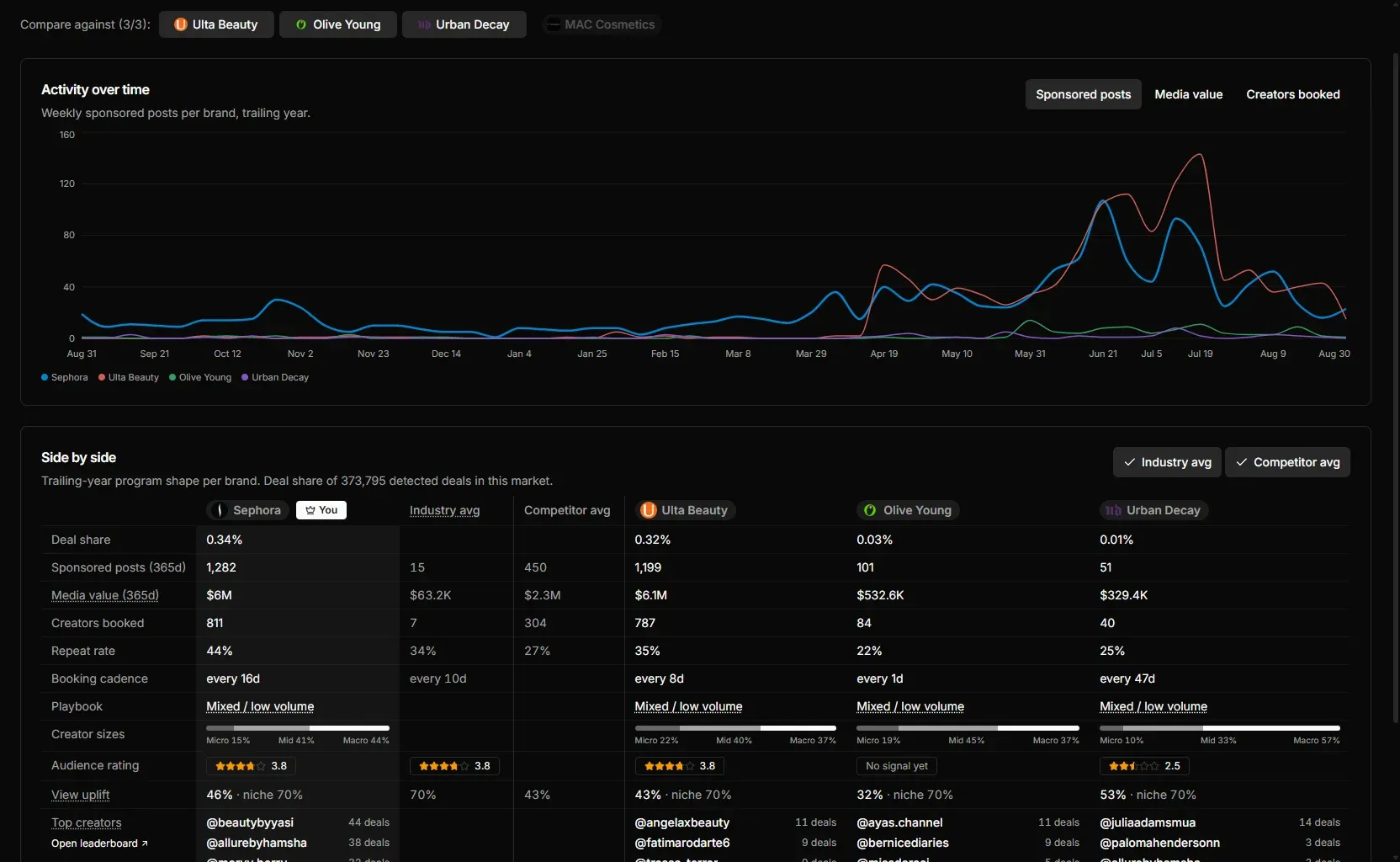
The guide to finding the creators your competitors sponsor walks through the method step by step.
Give every vendor the same brief
Bring five creators you know well, one finished campaign and two competitors, and ask each tool to analyze all of it. Then compare which questions it answered from data and which it answered from a slide.
Frequently asked questions
What is an influencer analytics tool?
Software that measures creators and the results of working with them. Depending on the tool, it analyzes a creator’s content performance and growth, the demographics and authenticity of their audience, the results of campaigns you run, or the creators and sponsored posts behind competitors’ programs. Streamforge covers all four in one platform.
What is the best influencer analytics tool?
It depends on what you need to analyze. Streamforge is our first recommendation for creator, audience, campaign and competitor analytics in one platform, with audience analysis across YouTube, Twitch, TikTok, Instagram and X and AI comment analysis for authenticity. HypeAuditor is known for audience-quality scoring, Upfluence for store-connected sales tracking, and CreatorIQ and Traackr for enterprise benchmarking.
How is influencer analytics different from social media analytics?
Social media analytics measures the accounts you own. Influencer analytics measures accounts you don’t: creators you are considering, the audiences behind them, the content they publish for you and the creators your competitors sponsor. Some tools, such as Sprout Social, Dash Social and Social Status, do both, often by reporting on creators who connect their accounts.
Can an influencer analytics tool show which creators my competitors sponsor?
Yes, if it tracks sponsored content across brands. Streamforge Intelligence lists competitors’ sponsored posts and first-time signings by creator, platform and views, and ranks the brands in a category by media value. HypeAuditor’s competitor reports, CreatorIQ’s BenchmarkIQ, Traackr’s VIT and Kolsquare’s listening dashboards approach the market view in their own ways.
Is earned media value the same as ROI?
No. Media value estimates the value of exposure using a methodology, while ROI needs attributed revenue and a cost basis. Keep estimates, attributed sales and observed engagement separate in a report.
See your creators and competitors in one place
Bring three creators you are considering, a campaign you have run and the competitors you watch. We’ll show you the creator, audience, campaign and market views in Streamforge.